


Machai Ghostwriter Python Wrapper (mgw)


Introduction
mgw provides a Python API and command-line entry point for the Machai Ghostwriter processor. It bridges Python applications with the bundled Java implementation, allowing users to run Ghostwriter without manually assembling a Java class path. The package starts JPype lazily, validates the Java environment, loads the bundled runtime, and forwards either command-line arguments or structured guidance and Act-processing options to the appropriate Java processor.
The package supports Python 3.9 or newer and includes the Ghostwriter runtime in its distribution. Its public operations cover ordinary Ghostwriter invocation (gw), guidance-tag processing (gdp), and Act execution (adw). Direct processor calls can also resolve additional local JAR files or Maven coordinates through jgo. Results are converted to ordinary Python values where appropriate, so callers do not need to manage JPype collections.
Project Structure
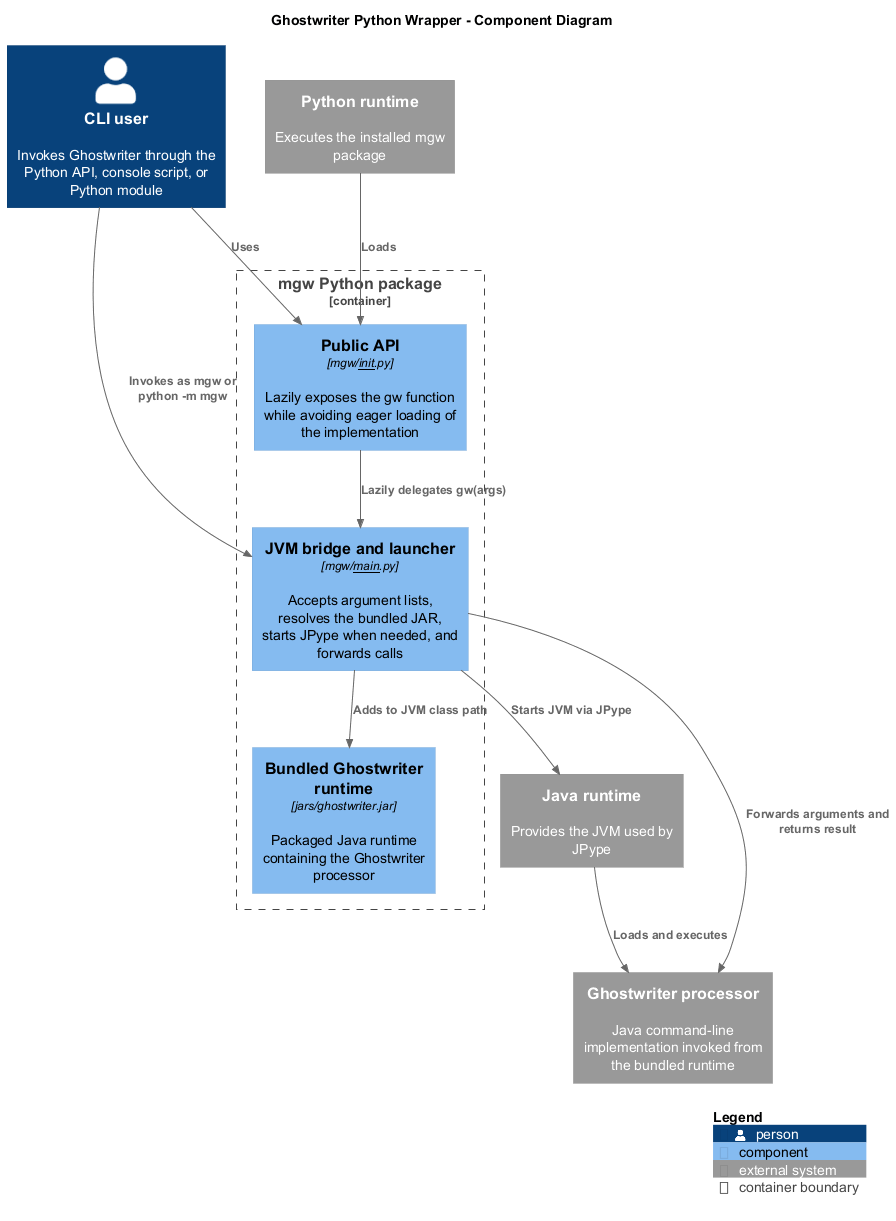
The system is organized around a small set of cooperating components:
- Public API: lazily exposes the wrapper functions so importing the package does not start a JVM.
- Command and processor bridge: validates
JAVA_HOME, resolves the embedded runtime, starts JPype on first use, and maps Python arguments to Ghostwriter processors. - Bundled Java runtime: supplies the Ghostwriter command, guidance processor, and Act processor used by the bridge.
- Python and Java runtimes: provide the execution environments in which the package and embedded processor run.
- CLI entry points: accept Ghostwriter arguments from an installed command or Python module and pass them through unchanged.
The public API delegates to the bridge, which starts the Java runtime with the bundled processor on its class path. The direct processors additionally configure project traversal, models, configuration files, exclusions, concurrency, timeouts, Act locations, and optional libraries before scanning the requested project.
Prerequisites and Installation
Before using mgw, install Python 3.9 or newer and a Java installation supported by JPype. JAVA_HOME must be defined and must point to an existing JDK or JVM installation; JPype must also be able to locate a valid JVM library through that installation. The package dependencies include jpype1>=1.4.0 and jgo>=1.0.0.
On Windows PowerShell, configure the Java environment and install the published package:
$env:JAVA_HOME = "C:\Path\To\Your\JDK"
$env:Path = "$env:JAVA_HOME\bin;$env:Path"
python -m pip install mgw
For a local checkout, build the embedded runtime and install the Python package:
mvn clean package -Prelease
python -m pip install .\src\main\python
The installed package contains the Java runtime, so no separate class-path configuration is required. The JVM is started only when one of the public operations is first invoked and is reused for subsequent calls in the same process.
Usage
Command line
Ghostwriter arguments can be passed directly through either supported entry point:
mgw --help
python -m mgw --help
General Ghostwriter invocation
Use gw when the caller already has the argument sequence expected by Ghostwriter:
from mgw import gw

result = gw(["--help"])
print(result)
If args is omitted, gw forwards the current process arguments after the executable name. It returns the result from the Java Ghostwriter command as a string.
Guidance processing
Use gdp to scan a project for guidance tags. The path may be a relative path, glob, or regular-expression matcher understood by the Java processor:
from mgw import gdp

report = gdp(path="src", project_dir=".", threads=2)
for item in report:
    print(item)
Act execution
Use adw to execute a named Act or Act expression against a project:
from mgw import adw

results = adw("my-act", path="src", project_dir=".")
for result in results:
    print(result)
Additional libraries may be local paths or Maven coordinates and are resolved before the JVM starts:
report = gdp(
    path="src",
    libs=["com.example:example-library:1.0.0", "lib/custom-tools.jar"],
)
Python API Reference
gw
def gw(args: list[str] | None = None) -> str:
Runs Ghostwriter through the Java command-line processor. args is an optional list of command-line arguments; when it is None, the function uses the current process arguments. The function starts the JVM lazily, invokes Ghostwriter, and returns its result as a string. JAVA_HOME must be set before the first invocation.
gdp
def gdp(
    model: str | None = None,
    project_dir: str | None = None,
    path: str = ".",
    config_file: str = "gw.properties",
    instructions: str | None = None,
    threads: int | None = None,
    excludes: list[str] | None = None,
    non_recursive: bool = False,
    module_thread_timeout_minutes: int | None = None,
    libs: list[str] | None = None,
) -> list[str]:
Processes guidance tags in the selected project and returns the Java processor report as a Python list. model selects the provider or model, project_dir identifies the project (defaulting to the current directory), path selects what to scan, and config_file supplies the configurator properties file. instructions overrides processor instructions. threads controls processing concurrency, excludes supplies path patterns, non_recursive limits traversal to the selected level, and module_thread_timeout_minutes sets the module timeout. libs accepts a list of local library paths or Maven coordinates. Thread and timeout values must be positive integers; libs and excludes must not be strings.
adw
def adw(
    act: str,
    model: str | None = None,
    project_dir: str | None = None,
    path: str = ".",
    config_file: str = "gw.properties",
    acts_location: str | None = None,
    interactive: bool = False,
    disable_normal_order: bool = False,
    libs: list[str] | None = None,
) -> list[str]:
Executes the non-empty act name or expression and returns the processor results as a Python list. model, project_dir, path, config_file, and libs have the same roles as in gdp. acts_location selects where Acts are loaded from, interactive enables interactive processing, and disable_normal_order disables the normal Act order. The function validates the Act name and the JVM prerequisites before scanning the project.
Building
To assemble the Java runtime and build the Python source distribution and wheel:
mvn clean package -Prelease
Set-Location src/main/python
python -m pip install --upgrade build
python -m build
The generated Python artifacts are placed in the package distribution directory. The release build includes the embedded Java runtime in those artifacts.
License
Apache License, Version 2.0.