


Machai Project
Machai is a multi-module Java toolkit for GenAI-enabled developer automation. It provides provider-neutral GenAI access, embedding support, Bindex library discovery, an MCP server, Maven integrations, and Ghostwriter workflows that can process source code, tests, documentation, site content, configuration, diagrams, and other project files.
The project is designed to make AI-assisted development repeatable and maintainable. Applications can use the GenAI client directly, expose tools through MCP, discover reusable libraries through Bindex, or automate repository-wide updates through the Ghostwriter command line and Maven plugin.
Modules
| Name | Description |
|---|---|
| Project Layout | A utility library for describing, detecting, and resolving conventional project directories. It gives build tools, scanners, generators, and plugins a consistent model for source, test, resource, and documentation locations across Maven, Gradle, JavaScript, Python, and fallback layouts. |
| GenAI Client | A provider-neutral Java library for generative AI integrations. It supports prompt execution, embeddings, provider resolution, usage tracking, web search, MCP servers, and registration of Java methods as AI-callable tools, prompts, and resources. |
| Machai MCP Server | A Java 17 Model Context Protocol server that exposes Machai functional tools and prompts through STDIO or HTTP transport. It supports stateless and streamable HTTP modes while keeping domain-specific tools in separate runtime libraries. |
| MCP Server Maven Plugin | A Maven plugin that starts the Machai MCP Server for a Maven project over HTTP. Its aggregator goals provide stateless or streamable transport and supply project metadata, parameters, tools, and project-directory context to the server. |
| Bindex Core | Core services for Bindex metadata retrieval, registration, semantic library recommendation, classification, embeddings, and MongoDB-backed persistence. It supports Ghostwriter, Maven plugins, MCP workflows, and AI-assisted project assembly. |
| Ghostwriter | An AI-powered, project-wide processing engine and command-line tool for source code, tests, documentation, site content, configuration, diagrams, and other project files. It uses embedded guidance and reusable Acts for repeatable AI-assisted automation. |
| Ghostwriter-Py (mgw) | A Python wrapper around the Machai Ghostwriter command-line processor. It bundles the Ghostwriter Java runtime beside the mgw package and uses JPype to start an embedded JVM and invoke Ghostwriter directly from Python through the gw function. |
| GW Maven Plugin | The primary Maven adapter for Ghostwriter. It runs guidance-driven processing or named and prompt-based Acts over selected project files, with project-wide and per-module goals, Maven settings integration, and Java class-introspection tools. |
| Ghostwriter MCP Server | A runnable Java 17 MCP server that packages Ghostwriter workflows, Bindex metadata services, and the Machai MCP runtime. It exposes project-assistance, metadata retrieval, registration, and library-recommendation capabilities through STDIO or HTTP. |
| Bindex Maven Plugin | A Maven plugin that generates and registers Bindex metadata for Maven projects and reactor builds. It provides reactor-wide and per-module goals that delegate generation and registration to Ghostwriter and Bindex Core workflows. |
| Bindex MCP Server | A Java 17 MCP application that packages Bindex Core with the Machai MCP runtime. It exposes metadata retrieval, registration, and semantic library recommendation tools through STDIO or HTTP. |
Project Structure
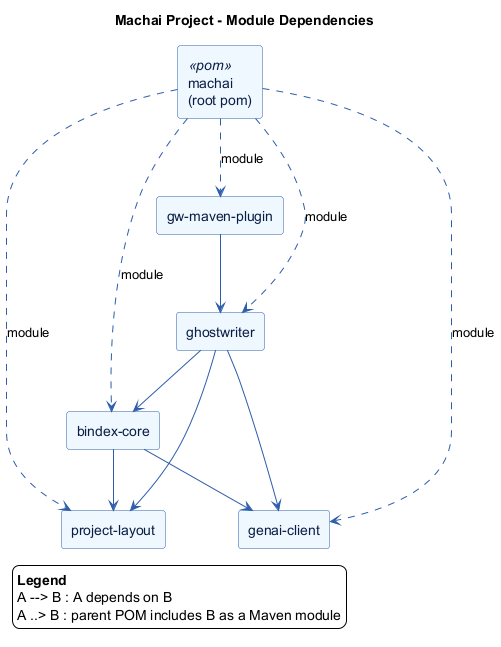
The project is organized as a Maven parent with eleven cooperating modules. The parent coordinates the build and module lifecycle. Project Layout supplies shared directory resolution, while GenAI Client supplies provider, embedding, and tool abstractions. Machai MCP Server provides the reusable MCP runtime, and MCP Server Maven Plugin starts that runtime from Maven. Bindex Core adds metadata generation, embeddings, persistence, semantic library discovery, and project assembly. Ghostwriter combines project-layout and GenAI processing for guidance-driven repository automation, Ghostwriter-Py exposes that command-line processor to Python through an embedded JVM, and GW Maven Plugin adapts the automation to Maven projects. Bindex Maven Plugin brings metadata generation and registration into Maven builds. Ghostwriter MCP Server packages Ghostwriter and Bindex capabilities, and Bindex MCP Server packages Bindex capabilities, with both distributions using the shared MCP runtime.
The diagram groups the modules into foundation libraries, core services, Maven build integration, and ready-to-run MCP servers. External Maven builds invoke the Maven plugins, GenAI providers supply model and embedding services, and MCP clients consume the packaged server capabilities over MCP. Internal relationships connect the processing and metadata services to the foundation libraries and connect each plugin or server distribution to the runtime it starts or publishes. All modules inherit from the parent project.
Installation
Prerequisites
- A JDK 17 or newer to build the complete reactor. The MCP server, MCP server Maven plugin, Bindex Core, Ghostwriter-Py, GW MCP Server, Bindex Maven Plugin, and Bindex MCP Server require Java 17; Project Layout, GenAI Client, Ghostwriter, and GW Maven Plugin target Java 8 bytecode.
- Apache Maven 3.8.1 or newer.
- Git and network access to clone the repository and download dependencies.
- Provider credentials and service configuration when using GenAI, Bindex, or custom functional tools.
Build from source
Clone the repository and build all modules:
git clone https://github.com/machanism-org/machai.git
cd machai
mvn clean verify
To build the site and stage its generated pages, use:
mvn clean install site site:stage
Some packaging profiles use MACHANISM_PACK_DIR for delivery artifacts. Set that environment variable before running mvn -Ppack install when a packaged CLI or server distribution is required.
Usage
Use a library
Add a published module as a Maven dependency. For example:
<dependency>
  <groupId>org.machanism.machai</groupId>
  <artifactId>genai-client</artifactId>
  <version>RELEASE</version>
</dependency>
Use the module pages for provider configuration, API details, and workflow-specific examples.
Run the MCP server
Build the server with its packaging profile, add functional tool libraries to the runtime classpath, and start STDIO mode:
mvn -pl machai-mcp-server -Ppack install
java -cp path/to/machai-mcp-server.jar:path/to/functional-tools.jar org.machanism.machai.mcp.server.McpServer
Start HTTP mode on port 45000:
java -cp path/to/machai-mcp-server.jar:path/to/functional-tools.jar org.machanism.machai.mcp.server.McpServer --port 45000
Run Ghostwriter through Maven
Process files containing guidance tags:
mvn org.machanism.machai:gw-maven-plugin:gw
Run an Act or direct prompt against a selected path:
mvn org.machanism.machai:gw-maven-plugin:act -Dgw.act="review Focus on public APIs" -Dgw.path=src/main/java
Configure the required AI provider, model, credentials, Bindex repository, and tool-specific settings before running AI-backed workflows.
Troubleshooting and Debugging
Machai uses SLF4J SimpleLogger in modules that provide a SimpleLogger binding. Configure it with a simplelogger.properties file on the runtime classpath, normally under src/main/resources or beside the application resources. The following example enables debug logging globally, enables trace logging for Machai packages, writes logs to standard output, and uses a readable timestamped layout:
org.slf4j.simpleLogger.defaultLogLevel=info
org.slf4j.simpleLogger.log.org.machanism=debug
org.slf4j.simpleLogger.log.org.machanism.machai=trace
org.slf4j.simpleLogger.logFile=System.out
org.slf4j.simpleLogger.showThreadName=true
org.slf4j.simpleLogger.showLogName=true
org.slf4j.simpleLogger.showShortLogName=true
org.slf4j.simpleLogger.levelInBrackets=true
org.slf4j.simpleLogger.showDateTime=true
org.slf4j.simpleLogger.dateTimeFormat=yyyy-MM-dd HH:mm:ss.SSS
Set org.slf4j.simpleLogger.logFile=System.err to send output to standard error, or set it to a writable path such as logs/machai.log to use a dedicated log file. The parent directories must already exist and the process must have permission to write there. Package-specific settings override the default level; valid levels include trace, debug, info, warn, error, and off. Remove a package-specific property when the global level should control that package.
The same settings can be supplied as JVM system properties and are useful when launching a packaged jar without changing its resources:
java -Dorg.slf4j.simpleLogger.defaultLogLevel=debug \
     -Dorg.slf4j.simpleLogger.log.org.machanism.machai=trace \
     -Dorg.slf4j.simpleLogger.logFile=System.err \
     -Dorg.slf4j.simpleLogger.showDateTime=true \
     -jar machai-mcp-server.jar
On Windows, use the equivalent single-line command, for example java -Dorg.slf4j.simpleLogger.defaultLogLevel=debug -Dorg.slf4j.simpleLogger.logFile=System.out -jar machai-mcp-server.jar. JVM properties must be placed before -jar. If logging changes do not take effect, check that slf4j-simple is present at runtime, that simplelogger.properties is on the effective classpath, and that no other SLF4J provider is selected.
Contributing
- Open an issue to describe a bug, documentation gap, proposed feature, or design question.
- Create a focused branch from the main branch and keep changes limited to the stated problem.
- Follow the existing Java and Markdown style, preserve guidance comments, and update relevant module documentation when behavior changes.
- Add or update tests for code changes and run
mvn clean verifybefore submitting. - Submit a pull request with a clear summary, testing details, and any configuration or compatibility impact.
- Respond to review feedback and keep the branch synchronized with the target branch.
License
Machai is distributed under the Apache License, Version 2.0. The project POM declares this license for all modules.
Contact and Support
- Machai project site
- GitHub repository
- GitHub issue tracker
- Machanism organization
- Maintainer: Viktor Tovstyi, [email protected]