


Machai MCP Server


Introduction
Machai MCP Server is a Java 17 server implementation for the Model Context Protocol (MCP) built on the Machai AI framework. It provides a bridge between MCP-compatible clients and Machai functional tools, allowing AI assistants and automation clients to discover, describe, and execute tool capabilities through a standard protocol interface.
The server is intentionally focused on orchestration rather than bundling built-in tools. It publishes tools and prompts supplied by additional libraries on the runtime classpath, which makes it suitable for teams that need a reusable MCP gateway for custom automation, coding, data, or internal platform tools. The same application can be used for local desktop integration over standard input/output or for remote access over HTTP.
The core value of the project is that it turns Machai functional tool implementations into MCP-accessible capabilities with minimal runtime setup. It handles server bootstrap, transport selection, tool discovery, MCP schema adaptation, prompt exposure, and request routing while leaving domain-specific tool behavior in independently packaged extensions.
The following diagram shows the high-level component structure and relationships within the project:
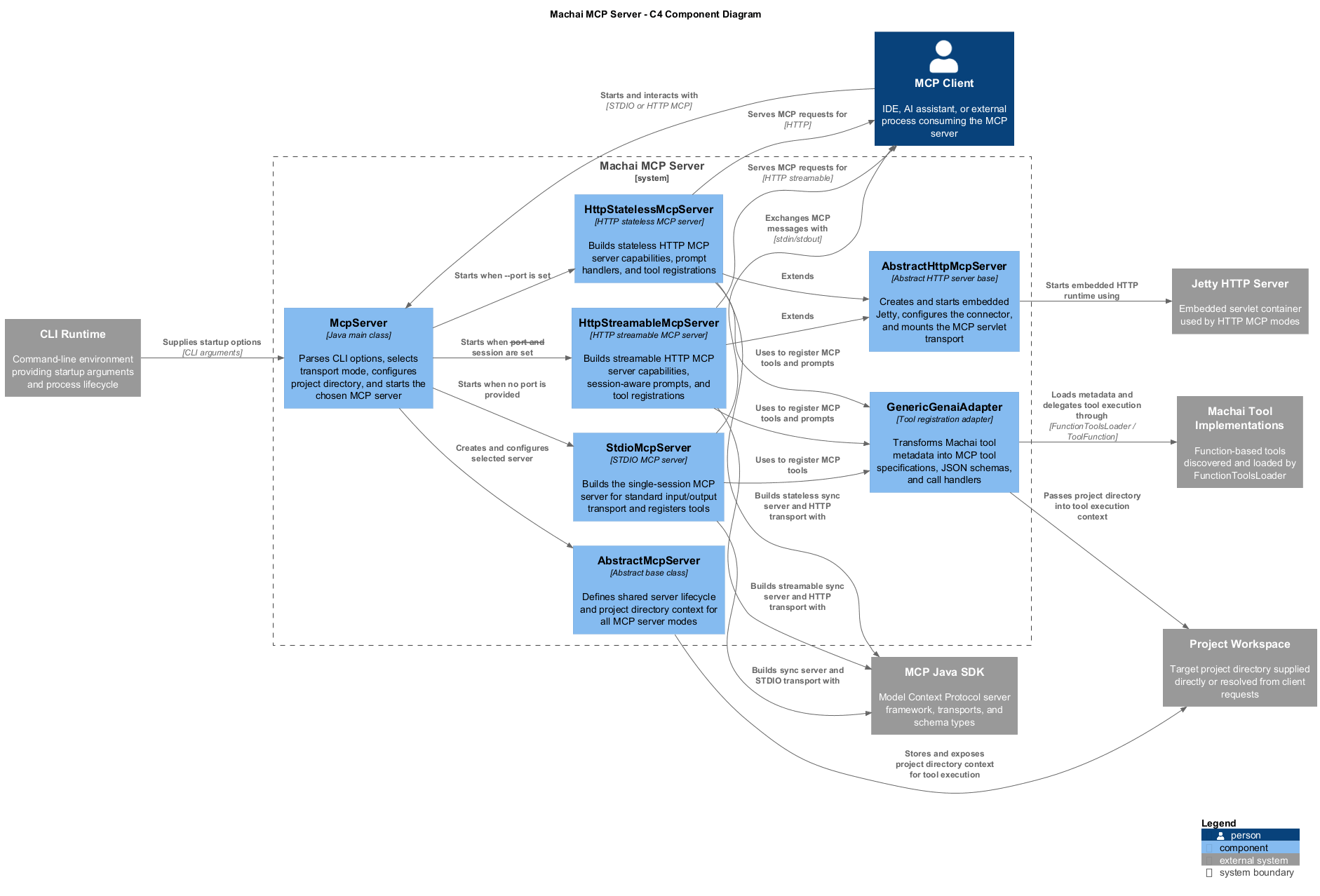
At a high level, the project contains:
- a bootstrap layer that parses command-line arguments, configures server metadata, and selects the runtime transport
- a shared MCP server abstraction that manages common server setup, project-directory context, tool registration, and startup behavior
- STDIO transport support for local client integrations that communicate through process input and output
- HTTP transport support for remote MCP access, including stateless and streamable session-oriented modes
- an adapter layer that converts discovered Machai functional tools and prompts into MCP-compatible definitions and handlers
- embedded web hosting that exposes the MCP endpoint when the server is launched in HTTP mode
Key Features
- Starts as either a STDIO MCP server or an HTTP MCP server from the same Java entry point
- Supports stateless HTTP mode and streamable HTTP mode for clients that require session-aware communication
- Discovers custom Machai functional tools and prompts from libraries available on the runtime classpath
- Converts tool metadata and parameter definitions into MCP-compatible schemas automatically
- Allows the server name and version reported to clients to be configured at launch time
- Supports an optional project directory that tools can use as execution context
- Uses Maven-based packaging, including an assembly profile for a runnable jar with dependencies
- Keeps domain-specific tools decoupled from the server so deployments can add or replace capabilities without changing server code
Getting Started
Prerequisites
Before running Machai MCP Server, ensure you have:
- Java 17 or newer, matching the
maven.compiler.releasevalue inpom.xml - Maven, if you plan to build the project from source
- the
MACHANISM_PACK_DIRenvironment variable set to a writable directory when building with thepackprofile; the assembled release jar is written beneath this directory - one or more Machai-compatible functional tool or prompt libraries on the runtime classpath; the server does not publish built-in tools by itself
- environment variables, credentials, model names, or service settings required by the loaded tools and their AI providers
- network access and an available TCP port if you plan to run HTTP mode
- an MCP-compatible client such as Claude Desktop, MCP Inspector, CodeMie Code, or another client that can connect to STDIO or HTTP MCP servers
Build
To build the project from source:
mvn clean package
To create the packaged distribution jar with dependencies using the assembly profile (after setting MACHANISM_PACK_DIR):
mvn -Ppack install
CLI
Basic Usage
Run the server in STDIO mode by placing the server jar and at least one functional tool container jar on the classpath:
java -cp /path/to/machai-mcp-server.jar:/path/to/functional-tool-container.jar org.machanism.machai.mcp.server.McpServer
Run the server in HTTP mode by providing a port:
java -cp /path/to/machai-mcp-server.jar:/path/to/functional-tool-container.jar org.machanism.machai.mcp.server.McpServer --port 45000
Typical Workflow
- Download a release package or build the server from source.
- Prepare one or more Machai-compatible functional tool libraries with the required service-provider registration.
- Add the server artifact and the tool libraries to the Java runtime classpath.
- Export any environment variables or credentials required by the selected tools and AI providers.
- Start the server in STDIO mode for local desktop integrations, or start it with
--portfor HTTP access. - Optionally pass
--projectDirso tools have a known project context. - Connect an MCP client and verify that the expected tools and prompts are available.
- Invoke tools through the MCP client and monitor logs when troubleshooting runtime behavior.
Java Version
The project requires Java 17, as defined by the Maven compiler release. Functional operation also depends on the additional tool libraries supplied at runtime and any services, credentials, model configuration, or project files those tools require.
Configuration
Command-Line Options
The application entry point defines the following command-line options:
-h,--help: shows the command-line help message and prints the available options before continuing with normal startup processing.-d,--projectDir <path>: specifies the project directory path. This value is passed to the MCP server and can be used by tools as execution context.-n,--name <value>: specifies the MCP server name exposed to clients.-c,--config <path>: specifies the configuration file path used to initialize the server's properties configurator. When omitted, the server attempts to loadmcp.properties; a missing default file is tolerated, while an explicitly supplied file must be readable.-v,--version <value>: specifies the MCP server version exposed to clients.-p,--port <number>: starts the application as an HTTP MCP server and listens on the specified port.-s,--session: uses streamable MCP server mode. This option is only meaningful for HTTP mode.
If --port is omitted, the application starts in STDIO mode. If --port is provided, the application starts an HTTP server. When --session is provided together with --port, the HTTP server uses streamable transport; otherwise it uses stateless HTTP transport. The --help option prints the available options. If no project directory is configured in HTTP mode, the server logs a warning and determines the project directory from the client request when possible.
Options Table
| Option | Description | Default |
|---|---|---|
-h, --help |
Show the help message and print available options before continuing with startup. | Not enabled |
-d, --projectDir <path> |
Set the project directory path used by tools as their execution context. | Not set; in HTTP mode it may be determined from the client request |
-n, --name <value> |
Set the MCP server name exposed to clients. | mcp-machai-server |
-c, --config <path> |
Set the configuration file path for server properties. | mcp.properties; a missing default file is tolerated |
-v, --version <value> |
Set the MCP server version exposed to clients. | Package implementation version, or latest when package metadata is unavailable |
-p, --port <number> |
Start the server in HTTP mode and listen on the specified port. | Not set; STDIO mode is used |
-s, --session |
Use streamable MCP server mode for HTTP transport. | Disabled; stateless HTTP mode is used when --port is set |
Example
The following example starts the HTTP server on port 45000, sets custom server metadata, provides a project directory, and enables streamable sessions:
export gw_model=CodeMie:gpt-5.4-2026-03-05
export embedding_model=CodeMie:text-embedding-005
export GENAI_USERNAME=your_username
export GENAI_PASSWORD=your_password

java -cp /path/to/machai-mcp-server.jar:/path/to/functional-tool-container.jar org.machanism.machai.mcp.server.McpServer \
  --projectDir /path/to/project \
  --config /path/to/mcp.properties \
  --name my-mcp-server \
  --version 1.0.0 \
  --port 45000 \
  --session
Publishing Function Tools from User JAR Files
To publish your own functional tool implementation:
- Implement the tool according to the Machai Functional Tools SPI documentation.
- Package the implementation into a jar with the required service-provider registration.
- Add both the server jar and your custom tool jar to the runtime classpath.
- Start the server and let it discover and register the tool automatically.
- Connect with an MCP client and call the published tool through the exposed MCP interface.
See the full guide here: Machai Functional Tools SPI documentation
STDIO MCP Server
Claude Desktop Configuration
{
  "mcpServers": {
    "stdio-mcp-server": {
      "command": "java",
      "args": [
        "-cp",
        "/path/to/your/machai-mcp-server.jar:/path/to/your/functional-tool-container.jar",
        "org.machanism.machai.mcp.server.McpServer"
      ],
      "env": {
        "gw_model": "CodeMie:gpt-5.4-2026-03-05",
        "embedding_model": "CodeMie:text-embedding-005",
        "GENAI_USERNAME": "your_username",
        "GENAI_PASSWORD": "your_password"
      }
    }
  }
}
Log File Location
When you run the STDIO MCP server, logs are written to a file for troubleshooting and monitoring. The default log file location for Claude Desktop on Windows is typically:
<user profile directory>\AppData\Local\AnthropicClaude\<app-version>\logs\machai-mcp-server.log
- Replace
<user profile directory>with your Windows user folder, such asC:\Users\YourUsername. - Replace
<app-version>with the installed Claude Desktop application version, such asapp-1.14271.0. - The file can contain server startup details, tool registration information, command execution records, warnings, and errors.
- Check this log first when diagnosing STDIO client integration issues.
HTTP MCP Server
Start MCP Server
export gw_model=CodeMie:gpt-5.4-2026-03-05
export embedding_model=CodeMie:text-embedding-005
export GENAI_USERNAME=your_username
export GENAI_PASSWORD=your_password
export BINDEX_REG_PASSWORD=your_bindex_password

java -cp /path/to/your/machai-mcp-server.jar:/path/to/your/functional-tool-container.jar org.machanism.machai.mcp.server.McpServer --port 45000
Claude Desktop Configuration
{
  "mcpServers": {
    "localMcpServer": {
      "command": "npx",
      "args": [
        "mcp-remote",
        "http://localhost:45000/mcp"
      ]
    }
  }
}
Testing
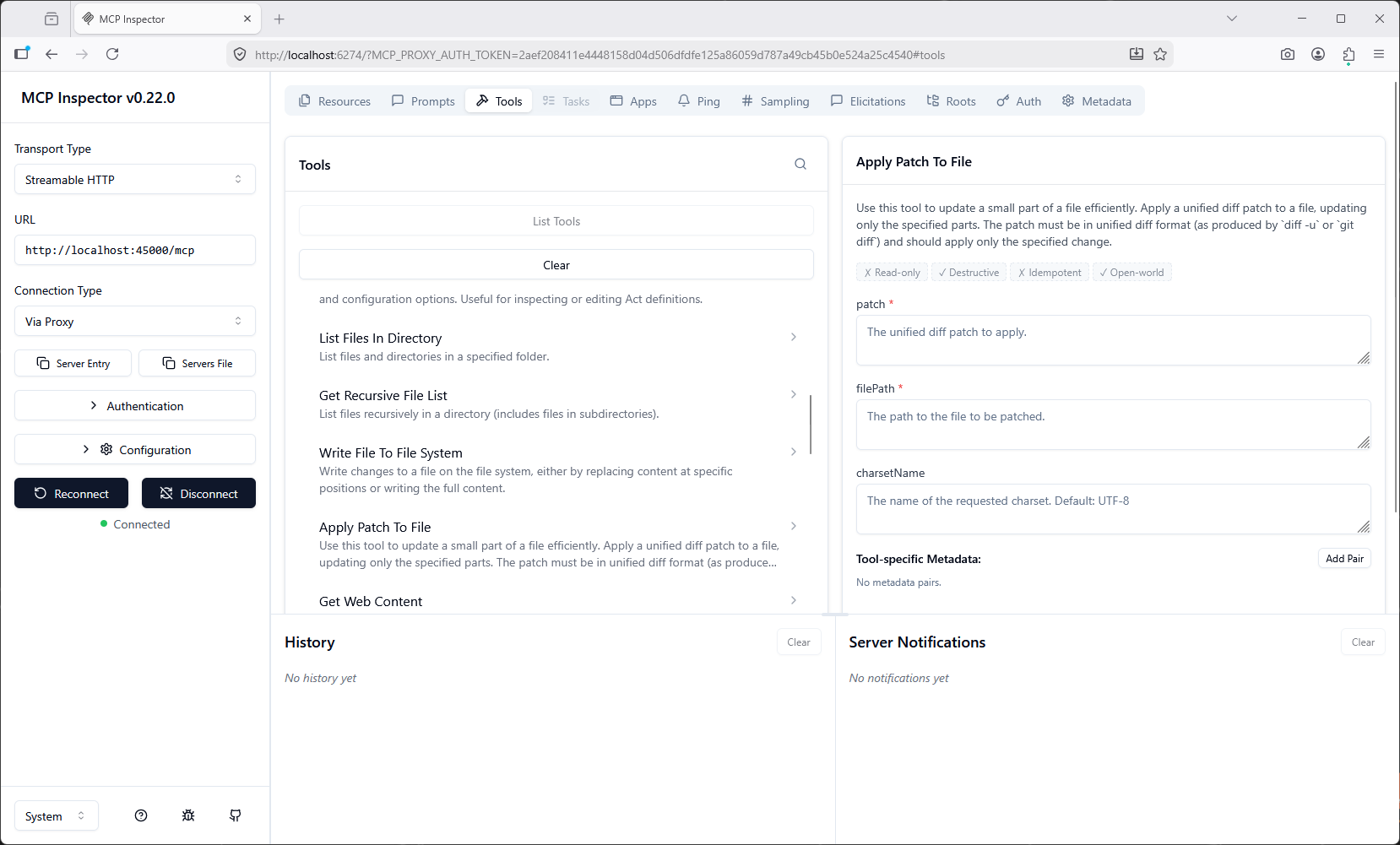
MCP Inspector
The MCP Inspector is useful for validating tool registration, prompt exposure, and runtime behavior while developing or integrating the server. For long-running tool calls, increase the request timeout in the inspector settings if needed.
See: MCP Inspector
Start the inspector with:
npx @modelcontextprotocol/inspector
Claude Desktop
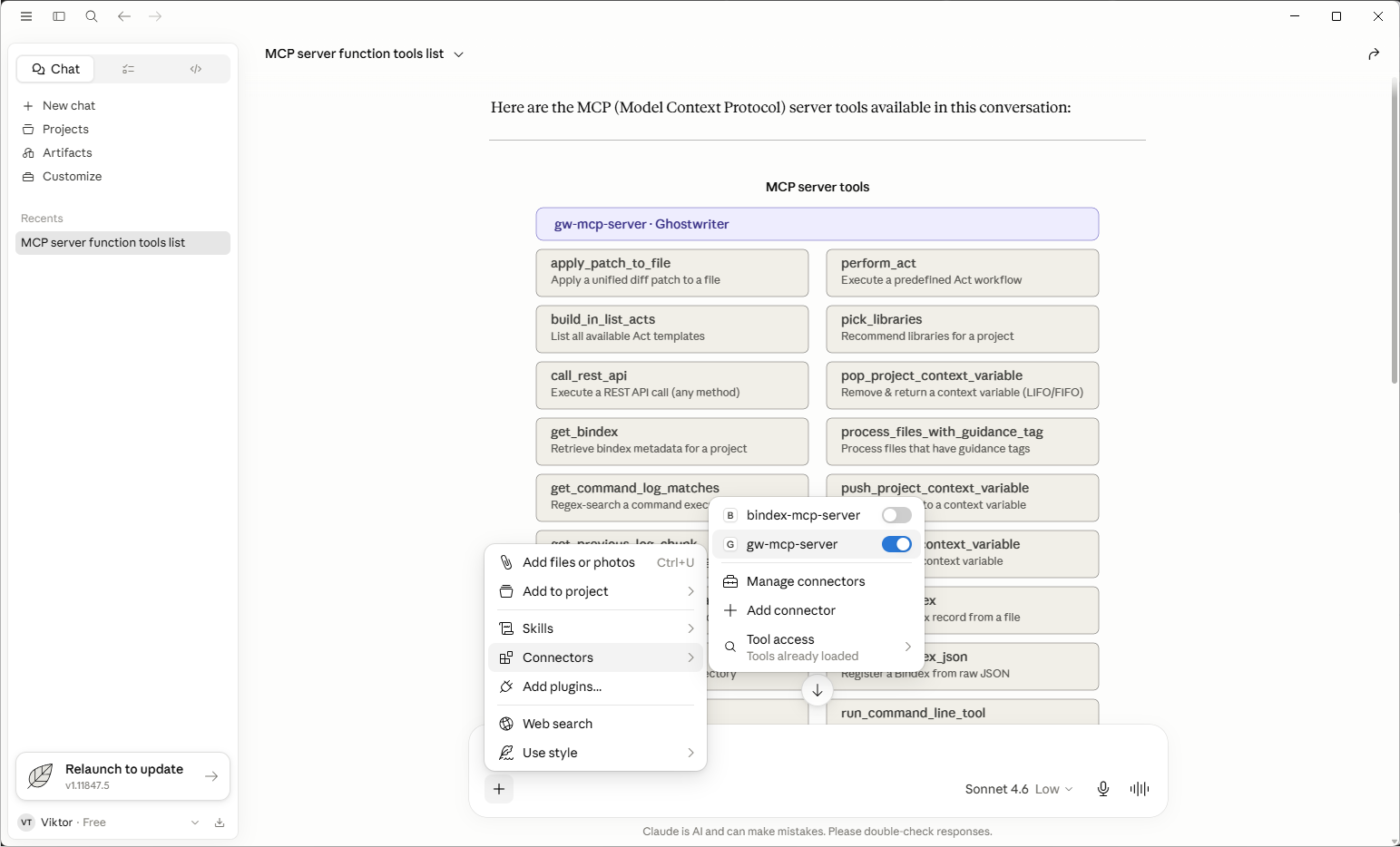
Claude Desktop is a practical client for connecting to both STDIO and HTTP deployments of the server. It is useful for validating end-user MCP integration, tool availability, prompt availability, and desktop-driven workflows.
See more: Desktop application
CodeMie Code
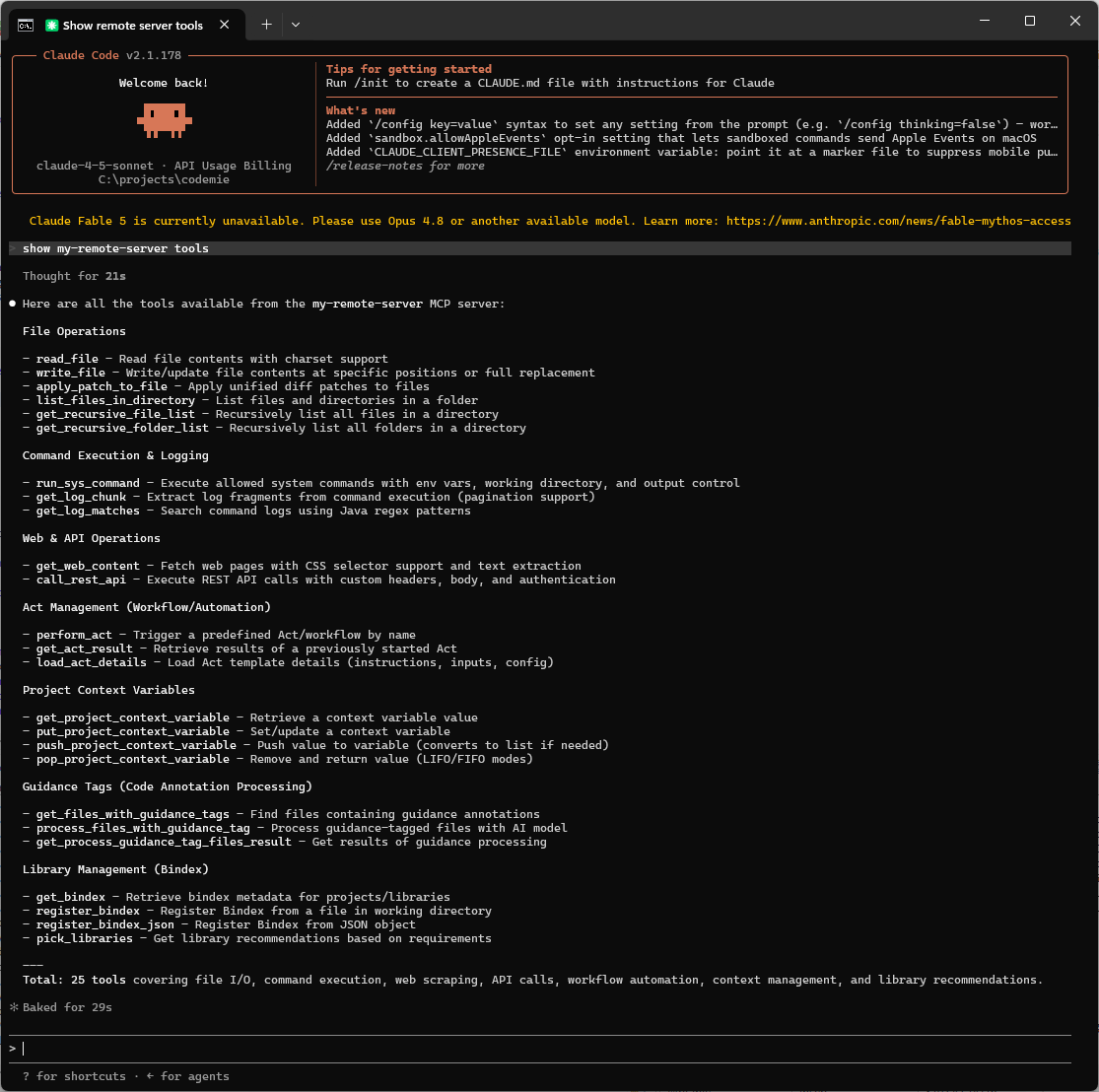
CodeMie Code is a unified AI coding assistant CLI that helps manage Claude Code, OpenAI Codex, Google Gemini, OpenCode, and custom AI agents from a single command-line interface.
Setup
Step 1 — Update CodeMie Code to the Latest Version
Run the following command in your terminal:
npm install -g @codemieai/code
Step 2 — Configure Your MCP Server
You need the MCP server URL provided by your server maintainer. For a local HTTP server started on port 45000, use http://localhost:45000/mcp.
Project-level configuration:
codemie mcp add --scope project mcp-remote-server "http://localhost:45000/mcp"
Global configuration:
codemie mcp add mcp-remote-server "http://localhost:45000/mcp"
Step 3 — Start Using CodeMie with MCP Servers
Launch the CLI tool as usual:
codemie-claude
Resources
- Official Machai platform: https://machai.machanism.org/
- GitHub repository: https://github.com/machanism-org/machai
- Maven Central artifact: https://central.sonatype.com/artifact/org.machanism.machai/machai-mcp-server
- Machai Functional Tools documentation: https://machai.machanism.org/genai-client/functional-tools.html
- SourceForge releases: https://sourceforge.net/projects/machanism/files/machai/machai-mcp-server/releases/
- Model Context Protocol Inspector: https://modelcontextprotocol.io/docs/tools/inspector