


GW Maven Plugin


Introduction
The GW Maven Plugin is the primary Maven adapter for the Machai Ghostwriter application. It integrates guided, AI-assisted file processing into Maven builds, enabling teams to analyze and maintain source code, tests, documentation, site content, configuration, and other project files within their existing workflow. The plugin discovers Maven project context, reads provider configuration and credentials, exposes Java class introspection tools, and delegates the actual work to Ghostwriter processors.
Its design follows the Guided File Processing pattern: guidance comments embedded in files describe desired changes, and Ghostwriter uses these instructions to scan and update selected paths. The gw:gw goal processes files containing guidance, while gw:act applies a named act or user-supplied prompt. Both goals support project-wide and per-module execution, exclusions, extra instructions, model selection, and Maven settings integration. Act input follows the plugin's documented form: -Dgw.act="[act name] [additional user prompt]"; when the value is only a user prompt, its first character must be > so it is not interpreted as an act name.
The aggregator goals are declared so Maven may invoke them without requiring a project; in practice, gw:act explicitly supports a directory without a pom.xml, while the guidance workflow relies on Maven project context during its current execution path. The gw:gw goal can coordinate modules independently, including parallel execution; gw:act processes modules in reverse order when coordinating the build, handling submodules before parent modules. Per-module variants (gw:gw-per-module and gw:act-per-module) participate in Maven's standard reactor and require a Maven project.
For the act goal, you can use a predefined act by passing its name directly. For a prompt-only act, prefix the prompt with > to indicate user input rather than an act name. Additional prompt text can follow an act name:
mvn gw:act -Dgw.act=review
mvn gw:act '-Dgw.act="review Improve the API documentation"'
mvn gw:act '-Dgw.act=>Add missing Javadocs to public classes'
The plugin serves as a Maven-facing orchestration layer that resolves the effective project and module layout, loads configuration, selects the scan path, registers optional class tools, and invokes GuidanceProcessor or ActProcessor. These processors then inspect and update requested project files through the configured AI provider. Maven settings can supply a provider server's username, password, and custom XML configuration. When no server ID is supplied, a local Ghostwriter properties configuration can be used.
Overview
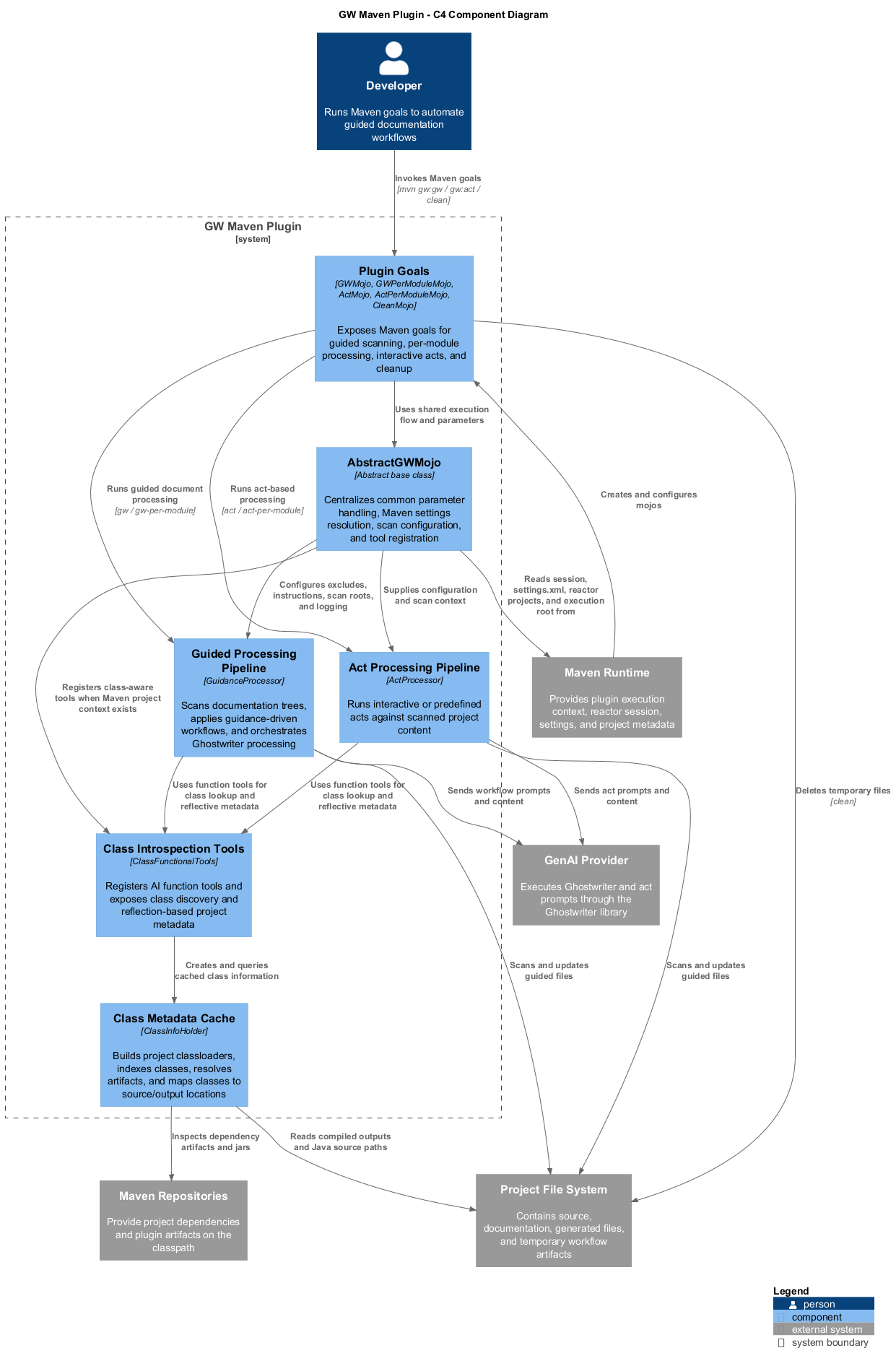
The architecture centers on developers invoking Maven, which supplies project, session, reactor, and settings context to shared goal implementations. The goals configure Ghostwriter guidance or act processors, which detect project layout, read and write project content, request AI assistance from external providers, and record usage statistics. Java projects can additionally expose class discovery and reflective metadata to the processor, grounding documentation work in the compiled or project classpath.
Project Structure
The component view shows the plugin as a Maven integration boundary: shared goal support resolves Maven context, provider configuration, scan settings, and diagnostics; guidance and act goals then create the corresponding Ghostwriter processor. The processors detect project layout, scan and update the selected project content, consult the configured AI provider, and can use Java class metadata gathered from the project and its compile dependencies. Maven settings and the interactive prompt service supply credentials/configuration and optional human input without exposing those concerns to the processors.
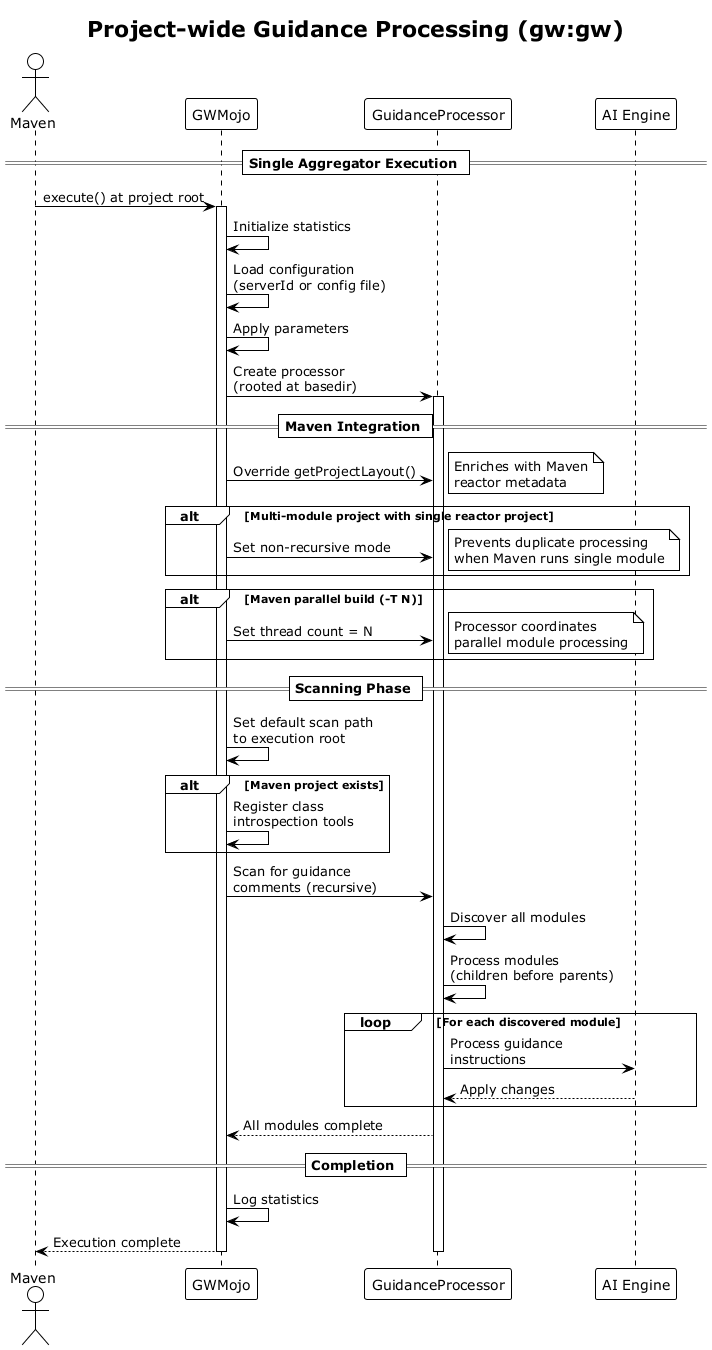
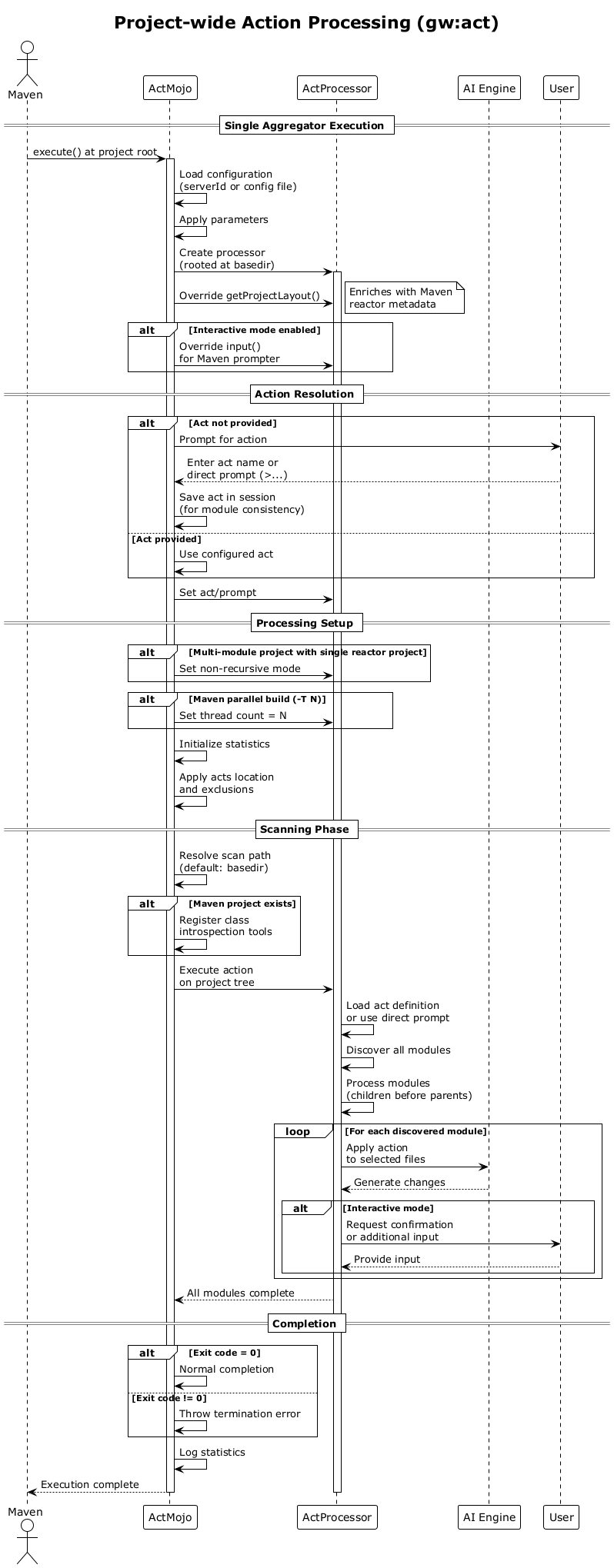
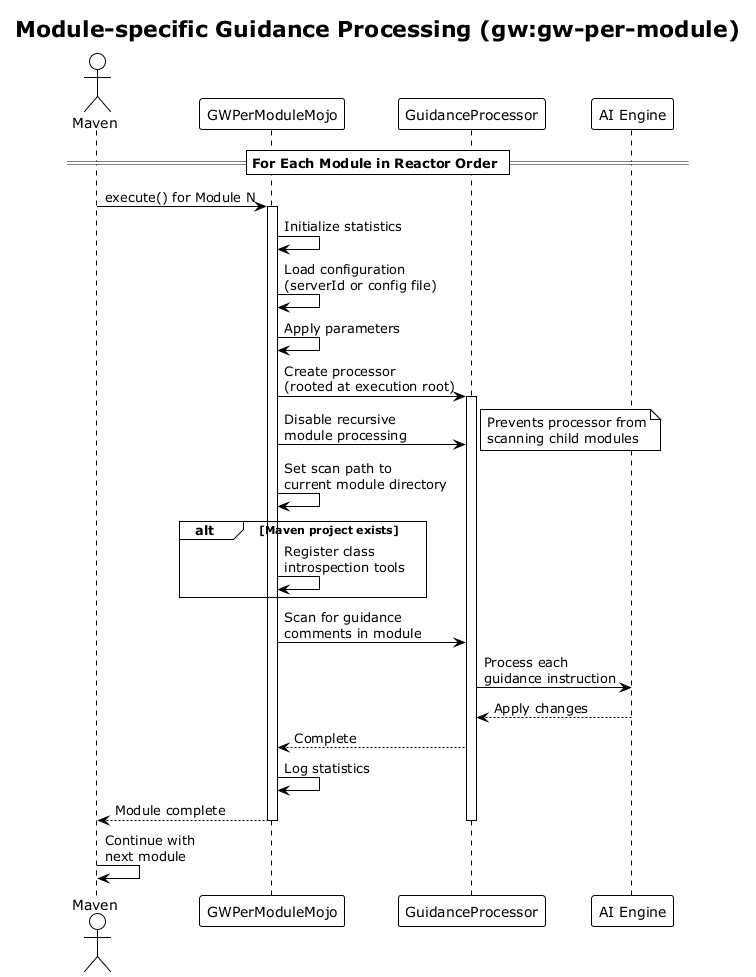
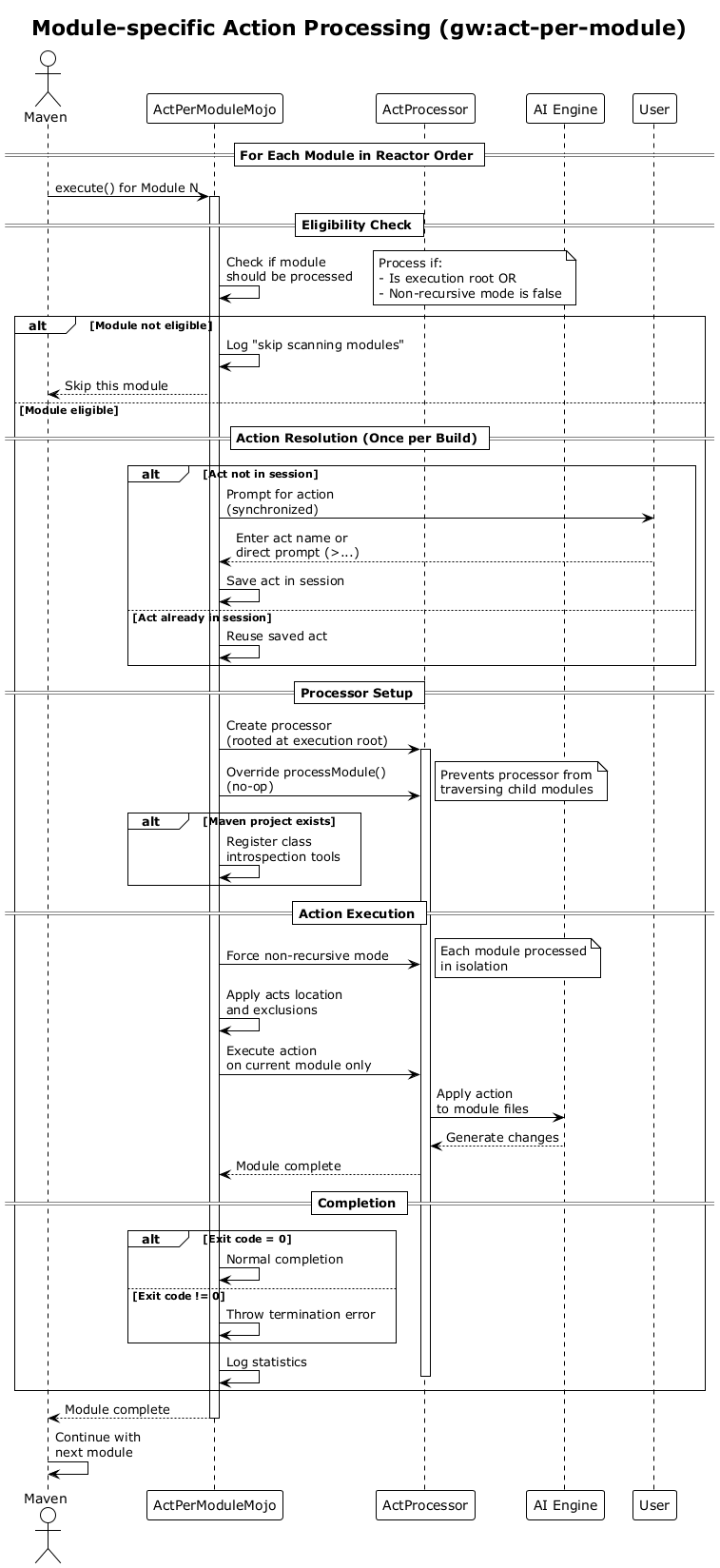
The workflow views show the same design in operation. Project-wide goals run once and let Ghostwriter coordinate traversal; with Maven parallel execution, they pass Maven's concurrency level to the processor. The guidance workflow discovers embedded instructions, whereas the act workflow resolves a named act or a prompt before processing. The reactor-oriented goals instead run in Maven's dependency-driven module sequence and constrain processor traversal so Maven retains responsibility for module scheduling. Across both styles, selected source, test, documentation, site, configuration, and other relevant project files can be processed.
Understanding the Plugin Architecture
The Ghostwriter Maven Plugin serves as a bridge between Maven build processes and AI-powered code processing capabilities. This plugin enables developers to leverage artificial intelligence for automated code analysis, documentation, and transformation tasks within their Maven projects.
Core Purpose and Philosophy
At its heart, the plugin operates on two fundamental principles: guidance-based processing and action-based processing. These represent different approaches to how AI interacts with your codebase.
Guidance processing allows developers to embed special comments directly in their source files. These comments act as instructions that tell the AI what to do when it encounters them. Think of it as leaving notes for an intelligent assistant who will later read through your code and follow your directions.
Action processing, on the other hand, applies predefined or custom operations across selected files. Rather than relying on embedded instructions, actions are like recipes that the AI follows to transform or analyze your code in consistent ways.
The Four Processing Modes
The plugin provides four distinct ways to invoke these capabilities, each designed for different scenarios:
Project-wide guidance processing scans an entire project hierarchy, looking for embedded guidance comments and processing them according to the instructions found. This mode understands the full context of multi-module projects and can coordinate changes across module boundaries.
Module-specific guidance processing operates within the confines of individual Maven modules. While it still looks for guidance comments, it respects Maven's module boundaries and processes each module in isolation according to Maven's dependency order.
Project-wide action processing applies a specified action across an entire project structure. Like its guidance counterpart, it can traverse module hierarchies and coordinate changes across the full project scope.
Module-specific action processing constrains actions to individual modules, ensuring that each module is processed independently without affecting its siblings or children.
Configuration Philosophy
The plugin embraces flexibility in configuration, recognizing that different teams and environments have varying needs for managing credentials and settings. Configuration can come from multiple sources, with a clear precedence order that allows both centralized management and local overrides.
When using Maven's server configuration mechanism, teams can centralize their AI provider credentials and settings in Maven's settings file. This approach keeps sensitive information out of project files while still allowing project-specific customization through additional parameters.
Alternatively, configuration can be loaded from dedicated configuration files, either explicitly specified or discovered by convention. This approach suits teams who prefer file-based configuration management or need to share configurations across different tools.
The plugin always allows runtime parameters to override any loaded configuration, ensuring that developers can adjust behavior for specific invocations without modifying persistent configuration.
Processing Flow and Intelligence
The plugin acts as an intelligent coordinator between Maven's build system and the AI processing engine. When processing begins, it first establishes the context by understanding the project structure, module relationships, and build configuration.
For multi-module projects, the plugin can operate in two distinct modes. In recursive mode, it allows the AI processor to discover and traverse module hierarchies according to its own logic. In non-recursive mode, it constrains processing to specific modules, preventing duplicate processing when Maven itself is handling module iteration.
The plugin enriches the AI processor's understanding of the project by providing Maven-specific context. This includes compiled class information, project metadata, and build artifacts. This enrichment allows the AI to make more informed decisions based on the actual build state rather than just source files.
Execution Patterns and Parallelism
Understanding when and how processing occurs is crucial for effective use. Aggregator goals run once at the project root and coordinate processing across the entire project structure. Per-module goals run multiple times, once for each module that Maven processes.
The plugin respects Maven's parallel execution capabilities. When Maven runs with multiple threads, aggregator goals pass this concurrency information to the AI processor, allowing it to parallelize its work appropriately. Per-module goals rely on Maven's own parallel scheduling, ensuring that module dependencies are respected.
Interactive Capabilities
The plugin recognizes that AI processing sometimes requires human input or clarification. It provides interactive modes where developers can be prompted for additional information during processing. This interaction is carefully coordinated to avoid confusion in parallel builds, ensuring that only one prompt appears at a time even when multiple threads are active.
Multi-line input is supported for complex instructions or prompts, allowing developers to provide detailed context or specifications when needed. The plugin handles the mechanics of collecting this input and passing it to the AI processor in a usable format.
Error Handling and Resilience
The plugin takes a pragmatic approach to error handling. Configuration errors that prevent processing from starting are reported immediately and clearly. Processing errors are logged with full context before being translated into Maven's error reporting system.
The plugin distinguishes between different types of termination. Normal completion, even if early, is handled gracefully. Exceptional termination with error codes is propagated appropriately, ensuring that build pipelines can respond correctly to different failure modes.
Integration Boundaries
The plugin maintains a clear separation of concerns. It handles all Maven-specific aspects: reading project structure, resolving dependencies, managing configuration, coordinating module processing, and translating between Maven's world and the AI processor's world.
The actual AI processing—understanding guidance comments, executing actions, generating changes, and managing the details of code transformation—remains the responsibility of the underlying processor implementation. This separation ensures that the plugin remains focused on integration while allowing the AI processing engine to evolve independently.
Key Features
- Guidance-driven processing: scans selected files for
@guidancecomments and applies the requested updates. - Act execution: runs reusable acts or direct prompts against project content.
- Four Maven goals: aggregator and per-module variants for both guidance and act workflows.
- Whole-project coverage: supports source, test, documentation, site, configuration, and other file types.
- Maven-aware context: uses project layout, execution-root, reactor, settings, and parallel-build information.
- Provider configuration: resolves model settings and credentials from Maven properties, a configuration file, or
settings.xmlserver entries. - Selective scanning: accepts files, directories, patterns, instructions, and exclusions.
- Java introspection tools: can find classes and retrieve class metadata, methods, fields, annotations, and source/artifact locations.
- Parallel and reactor workflows: supports Maven concurrency for aggregator goals and standard reactor scheduling for per-module goals.
- Usage tracking and diagnostics: initializes usage statistics and supports component-level SLF4J debug logging.
Getting Started
Prerequisites
- JDK and Maven installed and available on
PATH. - Network access to download Maven dependencies and reach the configured GenAI provider.
- A Ghostwriter-compatible provider/model configuration. Credentials may be stored in Maven
settings.xmlrather than on the command line. - A Maven project for the per-module goals and for the current
gw:gwguidance implementation, which uses Maven project context while configuring module traversal. Although both aggregator goals are declared withrequiresProject = false,gw:actis the aggregator implementation that explicitly supports processing a directory without apom.xml. - A project path containing the files to process and, for guidance mode, guidance comments describing the intended changes.
Java version
This module sets <maven.compiler.release>8</maven.compiler.release>, so its published bytecode target is Java 8. The practical runtime requirement can be higher because Maven, the Ghostwriter libraries, the selected AI provider, and their transitive dependencies must all support the JDK used to run Maven. Use a current supported JDK when provider or dependency documentation requires one, while retaining Java 8 compatibility for the plugin's own compilation target.
Basic usage
With the plugin available through Maven coordinates, run guidance processing or an act from the project root. Replace VERSION with the plugin version being used:
mvn org.machanism.machai:gw-maven-plugin:VERSION:gw
mvn org.machanism.machai:gw-maven-plugin:VERSION:act -Dgw.act=review
When the plugin is configured in the build, the shorter goal form is available:
mvn gw:gw -Dgw.path=src -Dgw.excludes=target,node_modules
mvn gw:act -Dgw.act='>Update the project documentation'
For a build with several modules, use mvn -T 4 gw:gw or mvn -T 4 gw:act when parallel processing is appropriate. Use gw:gw-per-module or gw:act-per-module when each module should be handled by Maven's reactor.
Typical workflow
- Add the plugin to the build or invoke it by its fully qualified Maven coordinate.
- Configure the model and provider credentials, preferably through a Maven
settings.xmlserver. - Select a project path and exclusions; provide an instruction file or inline instructions if the default behavior needs clarification.
- Add guidance comments to files for repeatable documentation/code maintenance, or select an act for an explicit task.
- Run the appropriate aggregator or per-module goal and review the generated changes.
- Build and test the project, then commit the guidance and resulting documentation together when the workflow is intended to be repeatable.
Practical Usage Patterns
In practice, teams typically use guidance processing during active development, embedding instructions in code that help maintain consistency, generate documentation, or ensure compliance with coding standards. The AI reads these embedded instructions and acts on them, like an intelligent pair programmer following written notes.
Action processing serves different needs, such as project-wide refactoring, analysis, or transformation tasks. Teams might define standard actions for common operations like updating documentation, reviewing security patterns, or modernizing code structures. These actions can then be applied consistently across projects or modules as needed.
The choice between project-wide and module-specific processing depends on the task at hand and the project structure. Project-wide processing suits tasks that need global context or coordination. Module-specific processing works better when modules should be treated independently or when integration with Maven's build lifecycle is important.
Configuration
The following properties are the common command-line names used by the mojos. They can also be supplied in the plugin's <configuration> element where Maven parameter names are used.
| Parameter | Description | Default value |
|---|---|---|
gw.model (model) |
Provider/model identifier passed to the Ghostwriter processor. | Provider or library default; unset in the mojo. |
gw.path (path) |
File, directory, glob, or supported pattern to scan. | Execution-root directory for gw:gw; basedir for gw:act; module base directory for per-module goals. |
gw.instructions (instructions) |
Additional inline instructions or an instruction-file location. | Unset. |
gw.excludes (excludes) |
Comma-separated paths/patterns, or configured exclusion values, skipped during scanning. | Unset. |
genai.serverId (serverId) |
Maven settings.xml server id from which provider credentials and custom configuration are read. |
Unset; the configured Ghostwriter properties file is used instead. |
gw.config (configFile) |
Optional Ghostwriter properties configuration file. The plugin attempts its default Ghostwriter configuration file when this is unset; values from a configured genai.serverId server are then applied to the effective configuration. |
Unset in the mojo; Ghostwriter's default configuration location is attempted. |
gw.act (act) |
Predefined act name, act plus prompt text, or a prompt-only value beginning with >. |
Unset; interactive input may be requested. |
gw.acts (acts) |
Directory or URL containing predefined act definitions. | Act processor default location. |
gw.interactive (interactive) |
Enables or disables interactive prompting when act configuration is incomplete. | Processor/configuration default. |
gw.threads |
Internal processor setting for worker threads when an aggregator coordinates parallel module processing; normally use Maven's -T option instead. |
Maven degree of concurrency when parallel execution is enabled; otherwise processor default. |
gw.nonRecursive |
Internal/user-property setting that can disable recursive module traversal for act or per-module execution. | Derived from the Maven reactor context. |
basedir |
Maven module base directory injected into the mojo. | Maven ${basedir}. |
project |
Current Maven project context used for layout and classpath metadata. | Maven ${project} when a project is present. |
session |
Maven session used for execution-root, reactor, and parallel-build context. | Maven ${session}. |
reactorProjects |
Read-only Maven reactor project list used during multi-module processing. | Maven ${reactorProjects}. |
params |
Additional key-value entries merged into the effective provider configuration. | Unset. |
A Maven server entry may contain username, password, and provider-specific child configuration values:
<server>
  <id>my-ai-provider</id>
  <username>provider-user</username>
  <password>provider-secret</password>
  <configuration>
    <AUTH_URL>https://provider.example/auth</AUTH_URL>
  </configuration>
</server>
Enable targeted debug logging with Maven's SimpleLogger property. For example:
mvn -Dorg.slf4j.simpleLogger.log.org.machanism.machai.gw.maven=DEBUG gw:gw
mvn -Dorg.slf4j.simpleLogger.log.org.machanism.machai.gw.processor=DEBUG gw:act -Dgw.act=review
Replace the package with any fully qualified class name and use an appropriate level such as TRACE, DEBUG, INFO, WARN, or ERROR:
-Dorg.slf4j.simpleLogger.log.[fully-qualified-class_name]=[LEVEL].
Resources
- Machai Ghostwriter — the application and processing platform.
- Guided File Processing — the conceptual foundation.
- Machai documentation
- Machai GitHub repository
- GW Maven Plugin on Maven Central
- Maven plugin configuration guide
- JDK installation