


MCP Server Maven Plugin


Introduction
The MCP Server Maven Plugin integrates a Machai Model Context Protocol (MCP)
server into a Maven build. Its two aggregator goals create and start an HTTP MCP
server using the current Maven project's name, version, and base directory. The
stateless goal provides a stateless HTTP transport, while streamable provides
the streamable HTTP transport. This lets an MCP client use the configured Machai
server and its tools directly from a Maven invocation, without a separate
launcher or a manually assembled runtime command.
The plugin applies values from params as JVM system properties without replacing
properties that are already set, loads a PropertiesConfigurator from the
configured file, applies the project directory and port, registers the tools from
that configuration, and starts the selected server. Startup and configuration
failures are reported as Maven execution errors. These capabilities make the
plugin useful for local development, repeatable integration tests, demonstrations,
and build-driven automation. Since both goals are aggregators, a reactor build can
expose one server representing the build rather than starting one server per
module.
Overview
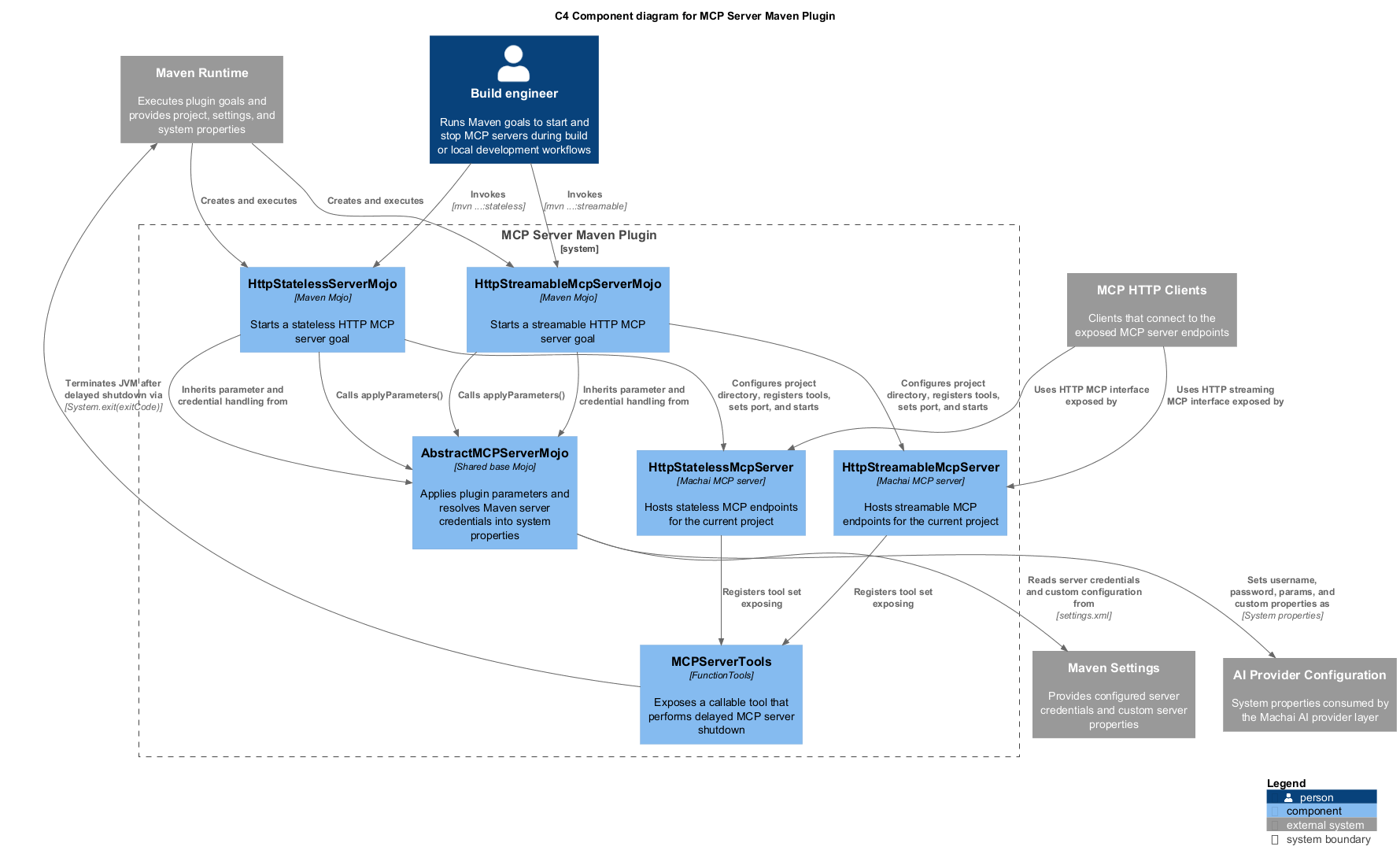
A build engineer invokes one of the plugin goals through Maven. The selected Mojo
shares parameter handling and configuration loading through the common server
Mojo, then creates the corresponding Machai HttpStatelessMcpServer or
HttpStreamableMcpServer. It supplies the Maven project metadata, project
directory, configured port, and tools before starting the server. MCP clients
connect to the resulting HTTP endpoint, and the lifecycle tool can request a
delayed JVM shutdown after the client has finished its work.
The project structure and interactions are illustrated below. The source diagram
is maintained at src/site/puml/c4-diagram.puml and rendered for the site as
./images/c4-diagram.png.
Goals
| Goal | Description | Key parameters |
|---|---|---|
stateless |
Aggregator goal that creates, configures, and starts an HttpStatelessMcpServer. |
mcp.port, mcp.config, basedir, project, and params |
streamable |
Aggregator goal that creates, configures, and starts an HttpStreamableMcpServer. |
mcp.port, mcp.config, basedir, project, and params |
Both goals apply params, load the configuration file, create the server with
the Maven project's name and version, set the project directory and port, register
the configured tools, and start the server. The port is a required Maven
parameter. A failure to load the configuration or start the server is surfaced as
a MojoExecutionException.
Getting Started
Prerequisites
- Java 17 or a compatible newer Java runtime, matching the plugin's compiler release.
- Apache Maven with access to this plugin and its transitive dependencies.
- A Maven project with a valid
pom.xmland a project base directory. - A readable MCP configuration file for the Machai
PropertiesConfigurator. - An MCP-compatible HTTP client and any credentials or AI-provider properties required by the configured Machai server and tools.
Basic usage
Run the stateless endpoint using the plugin's Maven coordinates:
mvn org.machanism.machai:mcp-server-maven-plugin:1.4.2:stateless \
  -Dmcp.port=8080 \
  -Dmcp.config=/path/to/mcp.properties
For streamable HTTP, use the streamable goal instead:
mvn org.machanism.machai:mcp-server-maven-plugin:1.4.2:streamable \
  -Dmcp.port=8080 \
  -Dmcp.config=/path/to/mcp.properties
The examples use the current project version, 1.4.2. The port must be provided,
and mcp.config should point to a file accepted by the Machai MCP server
configuration loader. The implementation dereferences that file when loading
configuration, so it should be supplied even though the Maven annotation does
not mark the parameter as required.
Typical workflow
- Prepare an MCP configuration file and resolve the plugin in the Maven project.
- Choose
statelessorstreamableaccording to the transport expected by the MCP client. - Supply
mcp.port,mcp.config, and anyparamsvalues before invoking Maven. - Run the aggregator goal from the desired project or reactor root; it uses the Maven project metadata and base directory to configure one server.
- Connect an MCP HTTP client to the selected endpoint and use the configured tools.
- Invoke
stop_mcp_serverwhen the server is no longer needed; it returns an acknowledgement and then performs a delayed process exit.
Configuration
The following parameters are injected by Maven into both Mojos. Parameters without
a Maven property can be supplied in the plugin configuration in pom.xml; the
two goals are aggregator goals, so the invocation is normally made from the
reactor or project root.
| Parameter | Maven property | Description | Default |
|---|---|---|---|
basedir |
— | Maven module base directory passed to the MCP server as its project directory. | ${basedir}; required |
project |
— | Read-only MavenProject that supplies the project name and version used to create the server. |
${project}; read-only |
port |
mcp.port |
HTTP port on which the selected MCP server listens. | No default; required |
configFile |
mcp.config |
File whose absolute path is passed to McpServer.getConfigurator(...) to load server configuration and tool settings. |
mcp.properties |
params |
— | Map of additional key/value values copied to JVM system properties only when the property is not already set; null values are ignored. | No default |
When mcp.config is omitted, the plugin resolves its mcp.properties default to
an absolute path relative to the Maven process's working directory; provide
mcp.config when the configuration file is elsewhere. Existing JVM system
properties take precedence over values in params, and null parameter values are
not applied. Keep configuration and credentials out of source control where
possible, and pass sensitive values through an appropriate secured Maven or
runtime mechanism.
Function Tools
The lifecycle function tool provides an MCP client with a controlled way to stop
the running server. It is supported for McpServer, as declared by the
function-tool implementation's @SupportedFor(McpServer.class) annotation.
stop_mcp_server
stop_mcp_server accepts the optional integer parameter exit_code, which
defaults to 0, and immediately returns MCP server shutdown initiated. It logs
the requested exit code, starts a background shutdown task, waits one second,
records usage statistics, and exits the JVM with that code. This is intended for
orderly termination after a client has completed its work; an interrupted delay
is logged before the shutdown continues.