


Ghostwriter


Introduction
Machai Ghostwriter is an AI-powered agent for maintaining an entire project rather than only the file open in an editor. It can work with source code, tests, documentation, website content, configuration, diagrams, and other relevant project files. Guidance is kept beside the content it governs, making requested changes explicit, reviewable, and repeatable; reusable workflows extend this approach to coordinated repository tasks.
Its conceptual foundations are Guidance-Driven Processing (GDP), which places durable instructions in project artifacts, and Act-Driven Workflows (ADW), which models reusable, multi-step AI workflows. Together, they make it practical to automate documentation maintenance, structured project changes, and CI/CD-friendly processing while retaining project-specific intent.
Overview
Ghostwriter resolves runtime settings, scans a selected project scope, and routes supported content to format-aware processing. In the default Guidance mode, it discovers embedded @guidance directives and processes the files that contain them. In Act mode, it executes a selected prompt workflow, sharing project context across its steps. Configured AI providers can use registered tools for safe project-file operations, approved commands, web and REST access, and workflow control.
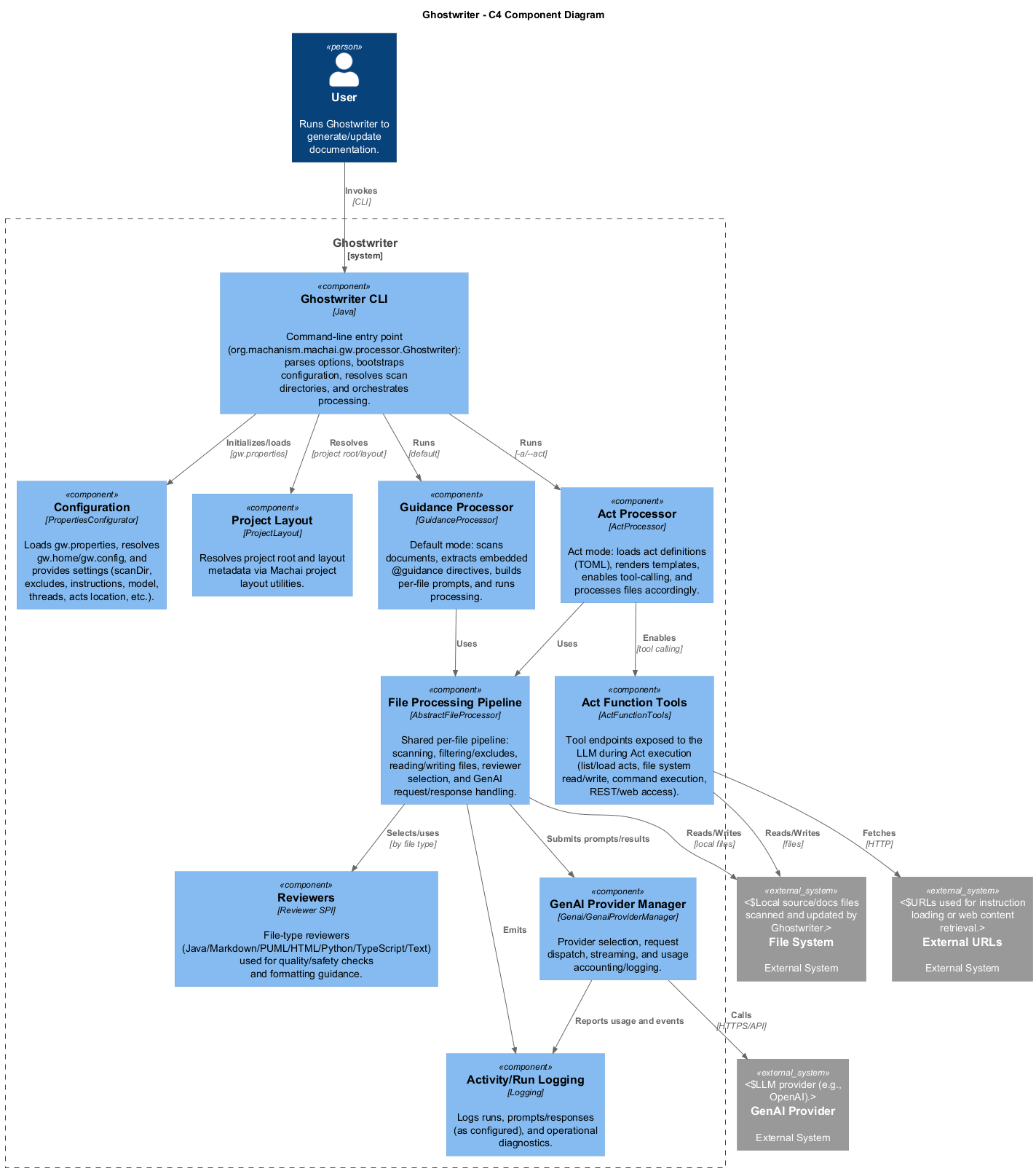
The architecture separates command-line startup and configuration from scanning, AI orchestration, guidance handling, workflow execution, and format-specific review. These services are supported by focused tool adapters and provider management, so local project operations and remote AI services can evolve independently. Users invoke the command-line interface; it selects the processing mode and coordinates these services against project content and optional remote resources.
Project Structure Overview
The project is organized as a command-line application with a shared processing core. Startup resolves configuration and selects either guidance processing or Act execution. Both modes scan the project and delegate AI-assisted work to format-aware reviewers. Provider management and tool registration connect that processing core to the configured model and to controlled capabilities for files, commands, web resources, Acts, guidance, and shared context. External project content, remote resources, and the GenAI provider remain outside the application boundary, allowing the same processing flow to be used locally or in automation.
Machai Ghostwriter vs. Other Tools
The closest widely known tool to Machai Ghostwriter is Claude Code. Both can operate across repositories, use tools, and assist with multi-file changes rather than only inline code completion. Claude Code is the nearest comparison because it supports agentic command-line workflows and project-level reasoning, but Ghostwriter is more specifically designed for repeatable project-wide automation driven by repository-embedded guidance, Maven/CLI execution, and reusable acts.
Key similarities
- Both support multi-file, repository-level work.
- Both go beyond autocomplete and can perform task-oriented engineering workflows.
- Both can be used from command-line-oriented environments.
- Both rely on configurable LLM-backed execution and tool-assisted context gathering.
Key differences
- Persistent guidance: Ghostwriter stores maintenance instructions in project files through
@guidancedirectives; Claude Code is primarily session- and prompt-driven. - Repeatable batch execution: Ghostwriter is optimized for scanning paths, glob patterns, and regex targets, making it suitable for scheduled repository maintenance and CI/CD jobs.
- Documentation-first automation: Ghostwriter explicitly targets documentation, project site content, diagrams, configuration, and source code as first-class project artifacts.
- Reusable acts: Ghostwriter supports predefined act workflows for repeatable automation with controlled tool access.
- Build ecosystem fit: Ghostwriter is distributed as a Java CLI and can be integrated into Maven-oriented delivery and automation flows.
Brief comparison with popular tools
Tabnine and GitHub Copilot focus primarily on editor-based completions and developer assistance. Cursor provides a richer AI-native IDE experience for interactive codebase edits. Claude Code provides the closest command-line, repository-aware agent workflow. Ghostwriter differs by treating project guidance and documentation maintenance as repeatable repository automation rather than an interactive coding session.
| Tool | Project-wide automation | Custom guidance | CI/CD integration | Documentation generation |
|---|---|---|---|---|
| Machai Ghostwriter | Yes | Yes, via embedded @guidance and acts |
Yes, CLI/Maven-friendly | Yes, first-class focus |
| Claude Code | Yes | Yes, prompt/session and project instructions | Possible, command-line oriented | Yes, prompt-driven |
| GitHub Copilot | Limited | Limited to editor/chat context and repository instructions | Limited, mainly GitHub ecosystem features | Yes, interactive/prompt-driven |
| Cursor | Yes, interactive | Yes, IDE rules and prompts | Limited, IDE-centered | Yes, interactive/prompt-driven |
| Tabnine | Limited | Limited | Limited | Limited |
Machai Ghostwriter is unique because it combines repository-embedded guidance, broad project-file support, reusable act workflows, and CI/CD-friendly batch execution into a governed automation model for keeping code, documentation, diagrams, and configuration aligned.
Key Features
- Scans directories, glob patterns, and regex-based targets.
- Detects embedded
@guidancedirectives in repository files. - Processes source code, documentation, project site content, configuration, diagrams, and other relevant artifacts.
- Integrates with configurable GenAI providers and models.
- Supports additional system instructions from plain text, URLs, files, or standard input.
- Applies exclusion rules for selective processing.
- Provides Act mode for reusable and ad-hoc prompt workflows.
- Supports configurable concurrency.
- Can log LLM request inputs for diagnostics and auditing.
- Records usage statistics at the end of processing.
- Fits both local development and CI/CD automation scenarios.
Getting Started
Prerequisites
- Java 8 or newer. The Maven build sets
maven.compiler.releaseto 8. - A configured, supported Machai GenAI provider and model, including any required credentials, endpoint, and network access.
- Read/write access to the target project; use network access when the provider, remote Acts, or referenced HTTP(S) resources need it.
- Maven 3.x to build from source. Building the delivery pack additionally requires the
MACHANISM_PACK_DIRenvironment variable.
Machai Ghostwriter CLI Pack
Download and unpack the delivery pack to run the CLI, or build the project with Maven. See Bindex Core for the related indexing component.
Basic Usage
Run the executable JAR with a path or pattern to scan:
java -jar gw.jar "glob:**/*.md"
The positional <path> can be a relative path inside the project, a directory name, a glob: pattern such as glob:**/*.java, or a regex: pattern such as regex:^.*/[^/]+\.java$. Absolute paths must remain inside the configured project directory. If no positional path is provided, Ghostwriter uses the configured path or ..
Typical Workflow
- Configure the AI provider, model, credentials, and project directory.
- Add precise
@guidancedirectives to the files that should govern their own processing, or create/select an Act workflow. - Start with a narrow file path or pattern and supply exclusions where needed.
- Run the CLI, review the resulting changes and command logs, and refine the guidance or Act.
- Reuse the same configuration and scoped command in CI/CD after validating it locally.
Java Version and Functional Requirements
Ghostwriter requires Java 8 or later. Functional processing also requires an available GenAI provider/model configuration; project writes require suitable file permissions, and remote providers or resources require the relevant credentials and network connectivity.
Configuration
Command-line values take precedence over properties loaded from the selected configuration file. Run java -jar gw.jar --help to print the complete CLI syntax, descriptions, and examples generated by Ghostwriter's help-printing implementation. The scan target is a positional argument; it may be a relative path, a directory, a glob: pattern, or a regex: pattern. If no target is supplied, the configured path is used, falling back to ..
Command-Line Options
| Option | Description | Default value |
|---|---|---|
-h, --help |
Print the usage header, positional path rules, all options, and examples, then exit without processing. | Not enabled |
-d <dir>, --projectDir <dir> |
Set the project directory used for processing. | gw.project.dir; otherwise the current user directory |
-c <file>, --config <file> |
Select a configuration properties file. Relative paths are resolved from the project directory. | gw.properties; the gw.config system property can select another file |
-t <n>, --threads <n> |
Set concurrent processing threads; higher values can improve throughput but increase resource and provider use. | gw.threads, otherwise the processor default |
-m <provider:model>, --model <provider:model> |
Select the GenAI provider and model, for example OpenAI:gpt-5.1. |
gw.model, otherwise unset |
-i [text], --instructions [text] |
Set system instructions. When used without text, prompt for the instructions on standard input. | gw.instructions, otherwise unset |
-e <list>, --excludes <list> |
Supply comma-separated directories or patterns to skip. | gw.excludes, otherwise unset |
-as <dir>, --acts <dir> |
Set the location containing predefined Act prompt files. | gw.acts, otherwise the Act processor's default location |
-a [name], --act [name] |
Enable Act mode and optionally select the Act; prompts for a name when supplied without one. | Guidance mode; gw.act when configured |
Example
The following command uses a scoped scan, custom project directory, provider/model, concurrency, exclusions, and instructions:
java -jar gw.jar "glob:**/*.md" --projectDir . --model "OpenAI:gpt-5.1" --threads 4 --excludes "target,.git" --instructions "Keep headings consistent and preserve public links."
For Act mode, use --act with an optional Act name, for example java -jar gw.jar . --act documentation-update. The built-in help also shows raw directory, relative-path, glob, and regular-expression scan examples.