


The Act
An Act is a reusable Ghostwriter workflow. Instead of writing the same request and tool setup every time, you select an act by name. Its TOML file supplies instructions, prompts, optional file-selection settings, and tool access. Ghostwriter then applies the workflow to the current project, a folder, or matching files.
Acts sit on top of AIFileProcessor: ActProcessor loads and combines the TOML configuration, prepares the user request and episodes, and delegates each prompt to the AI file processor. The file processor supplies project and file context, loads permitted tools, expands supported prompt content, and calls the configured AI provider. It also supplies structured processing information containing the relative file path, operating-system name, and interactive-mode notice. This makes acts suitable for routine work such as creating documentation, generating tests, reviewing SonarQube findings, or running a carefully scoped custom task.
For a broader introduction to this style of automation, see Act-Driven Workflows (ADW). To learn how modules and individual project files are traversed and processed while an act's episodes run, see Module & Project File Processing during Act Steps.
Key operations
For users invoking an act through Ghostwriter, the important operation is ActProcessor.setAct(...): it accepts an act name, optional request text, and optional episode selector, then loads and configures the workflow. ActProcessor.getResults() returns the responses collected during the run. Internally, ActProcessor delegates each episode to AIFileProcessor.process(...); that processor prepares the prompt, context, model, and tools before calling the AI provider. These operations separate a repeatable workflow definition (the TOML file) from the project-specific work performed in each run.
What happens when an act runs
At a high level, ActProcessor.setAct(...) interprets the act name, optional request text, and optional episode selection. It then loads the TOML definition (and any parent definition), applies defaults and configuration, and prepares the episodes. During project traversal, ActProcessor runs each selected episode for each matching file. For each episode, AIFileProcessor.process(...) adds project and execution information, reads YAML front matter, resolves permitted tools and runtime substitutions, and sends the resulting instructions and prompt to the configured AI provider. The collected provider responses are available from ActProcessor.getResults().
Quick start
- Choose a built-in act, for example
unit-tests, or createmy-review.tomlin your configured acts directory. - Run the act by name with
gw --act <name>, optionally adding a request after the name. For example,gw --act unit-tests Focus on the parser package. - The text after the name is the requested task. When the act has not already supplied
public.prompt(including through a default), it becomes the user prompt available to the TOML template as${public.prompt}. - The act loads its instructions, tools, inputs, defaults, and any parent act. It then processes the selected project files or project-level episodes.
- Review the result. In interactive acts, continue the conversation or end it using the commands described below.
A command beginning with > is shorthand for the generic task act. For example, gw --act "> summarize the project structure" is treated as task summarize the project structure. If no act is named, Ghostwriter uses help.
Act TOML anatomy
A simple act has an optional description, instructions for the AI, and one or more inputs:
description = "Review a project area."

instructions = '''
Explain findings clearly and make only necessary changes.
'''

inputs = '''
---
enabledTools:
  - org.example.ProjectTools:read_project
---
Review ${public.prompt}.
'''

[default]
public.prompt = "the project structure"

[gw]
interactive = true
description is a short, human-readable explanation of what the act is for; use it to help people choose the right workflow. instructions provide stable, system-level guidance. inputs hold the prompt sent for an act or episode. [gw] settings configure Ghostwriter behavior, including path, interactive, threads, excludes, and nonRecursive. Other string settings are made available through the configurator. A TOML inputs value can be a single string or an array of strings.
Default user prompt: the prompt property
The prompt property used by an act is the dotted TOML key public.prompt (not a separate top-level prompt key). Set default.public.prompt in the TOML file to provide the default request used when no direct public.prompt value has already been configured:
[default]
public.prompt = "Review the project for documentation gaps."

inputs = '''
Perform this request: ${public.prompt}
'''
The resulting value is stored as public.prompt and can be inserted anywhere in the prompt with ${public.prompt}. A value already supplied as public.prompt is retained rather than replaced. Defaults are applied before the request text appended to the act name is bound. Consequently, an act that defines default.public.prompt retains that default unless the caller supplies public.prompt through configuration; appended request text does not replace it. If an act must use the text appended after its name, do not set a competing default.public.prompt, or arrange for the caller to set public.prompt explicitly.
For example, gw --act doc-audit uses the configured default when no public.prompt has been supplied. A caller that needs a different default can set public.prompt through its configuration before starting the act; keep ${public.prompt} unchanged in the TOML template so that runtime substitution can occur.
Prompt front matter and tools
An input may start with YAML front matter between --- lines. gw.model selects a model/provider for that prompt. enabledTools can be a whitespace-, comma-, or semicolon-separated value or a YAML list:
inputs = '''
---
gw.model: ${public.reviewModel}
enabledTools:
  - org.machanism.machai.gw.tools.ProjectContextFunctionTools:get_project_context_variable
  - org\.machanism\..*:read_file
---
Inspect ${public.prompt}.
'''
Each enabledTools item is a regular-expression pattern. A tool is identified internally as <ClassName>:<toolName>—for example, org.example.Tools:read_file; the tool name is its declared name, or the method name when no explicit name exists. A tool is registered only when its full identifier matches at least one pattern. If enabledTools is null or omitted, all available tools are registered without filtering. Use precise patterns when an act needs limited capabilities. The patterns are not display labels: write the fully qualified implementation-class name followed by : and the declared tool or method name.
Prompt and instruction lines can include content using >>> URL or >>> file://relative/path; included UTF-8 content is processed recursively. Public configuration values can be substituted in prompt metadata and text.
Automatic tool selection: enabledTools: auto
An act can ask Ghostwriter to choose tools for an episode instead of maintaining a fixed pattern list. Put enabledTools: auto in that episode's YAML front matter:
inputs = '''
---
enabledTools: auto
---
Review the selected files and make the required changes.
'''
Before running the episode, Ghostwriter asks the configured AI provider to select the relevant tools from the available set using the act instructions and episode prompt. The resulting selection is cached for that act and episode, then only those tools are registered for the actual request. To give the selector an additional constraint, use an auto mapping:
inputs = '''
---
enabledTools:
  auto: Don't use web access and system command tools.
---
Analyze the local implementation.
'''
The mapping value guides selection; it is not a hard tool denylist. Use explicit regular-expression patterns when a strict, predictable tool boundary is required.
If automatic selection returns no enabledTools value or cannot be completed, Ghostwriter falls back to the normal unfiltered behavior, so all available tools may be registered. Use explicit regular-expression patterns rather than auto whenever a restricted tool boundary is required.
Placeholders
Write dynamic placeholders exactly as ${...}, such as ${public.prompt}, ${sonar.host}, ${sonar.token}, and ${super.value}. They are runtime substitution points for the configurator and functional tools: environment values, system properties, action properties, and similar configured sources can provide their values. The LLM must not edit, resolve, rename, or otherwise modify these placeholders in an act template; they must remain intact until the runtime component performs substitution.
Episodes and input parameters
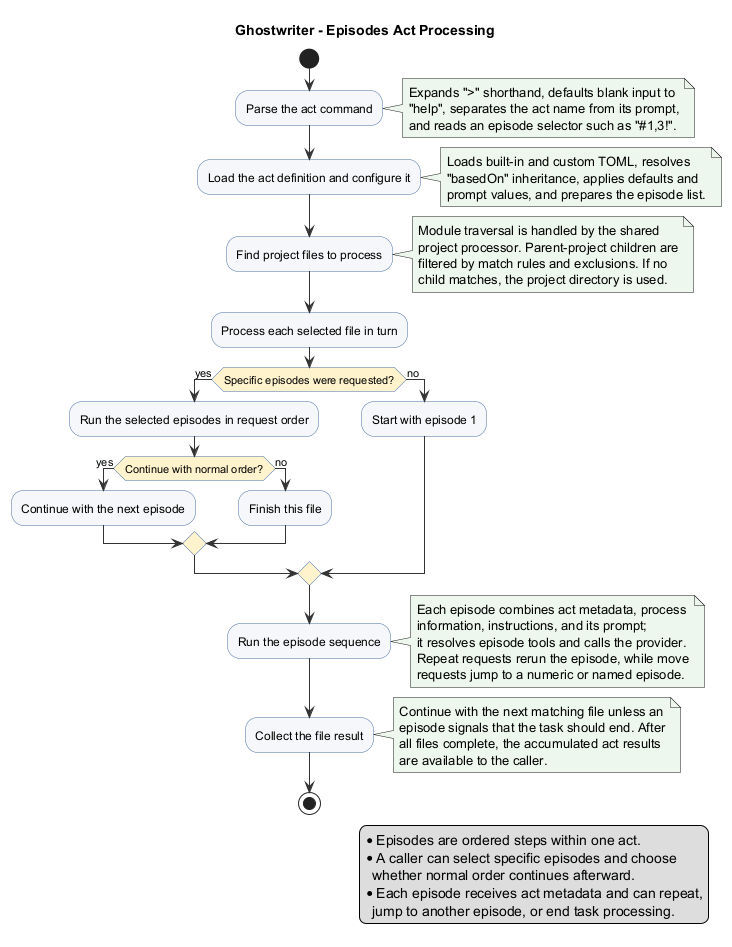
When inputs is an array, every item is an episode: an ordered prompt in one larger workflow. This supports staged work—for example, inspect first, make changes second, and validate third. An act can also use a single input, which becomes the default prompt.
Select particular episodes by adding # to the act name. Episode numbers are comma-separated, and ! prevents normal sequential processing after the requested episodes:
review#1,3! Check concurrency and error handling
This runs episodes 1 and 3 with the supplied request, then stops rather than continuing in normal order. Without !, selected episodes run and normal ordering may continue. Episodes can also request movement to another episode during processing.
The YAML input parameters recognized specially by AIFileProcessor are:
gw.model— overrides the configured AI model/provider for the prompt.enabledTools— a string or YAML list of regular-expression patterns controlling registered tools.errorHandling— when configured, controls provider error handling for the request.- Other YAML values are retained as prompt configuration; string values are resolved through the active configurator, but they do not by themselves change processing behavior.
For every processed item, Ghostwriter supplies processing information containing PROCESSED_FILE_REL_PATH, OS_NAME, and (in non-interactive mode) the notice Do not ask any question because this is not-interactive process mode. The act additionally prepends JSON execution metadata containing the current episode information. Project-context tools receive the project name, IDs, directories, source/test/document folders, modules, and operating-system context.
For a detailed look at how an episode's file-selection settings (such as path, excludes, and nonRecursive) determine which modules and files are visited, and in what order, see Module & Project File Processing during Act Steps.
Interactive and non-interactive acts
A non-interactive act is a predefined command: it can run from its configuration without asking for extra data. This is useful for repeatable tasks such as generating documentation or tests. Add request text only when you need to narrow or customize the work.
Set gw.interactive = true when the act should operate as a chat. Interactive mode is useful when the desired action is not fully known at the beginning: the AI responds, then you can provide the next instruction. After a response:
- Enter
>(AIFileProcessor.CONTINUE_SPECIAL_PROMPT_COMMAND) to accept the current response and continue processing without another AI prompt. - Enter
.(AIFileProcessor.EXIT_SPECIAL_PROMPT_COMMAND) to terminate the act successfully. - Enter
>>(NO_INTERACTIVE_SPECIAL_PROMPT_COMMAND) to accept the current response and switch the remaining work to non-interactive processing. This is useful when a conversation has clarified the task and the remaining episodes should finish unattended. - An empty entry has no special command meaning; when the hosting environment supplies it, it is treated as ordinary follow-up input rather than as a continue or exit command.
- Enter any other text to send it as the next chat prompt.
These are literal command values: AIFileProcessor.CONTINUE_SPECIAL_PROMPT_COMMAND is >, and AIFileProcessor.EXIT_SPECIAL_PROMPT_COMMAND is .. Enter the character by itself after a response, not as part of a longer request.
The source guidance also asks about an empty value written as ``. No constant or command is associated with that empty value in AIFileProcessor, so there is no runtime value to enter or document; use the named commands above instead.
Interactive input requires an environment that supports it. The base AIFileProcessor does not read a console by itself: an embedding command-line or UI implementation must provide the next input. In a non-interactive execution environment, acts proceed without chat input; use a predefined non-interactive act when the task must run unattended.
Interactive chat is also incompatible with multi-module parallel processing. When gw.threads is greater than 1, AIFileProcessor.processModulesMultiThreaded() logs a warning and disables interactive mode before it starts worker threads. Use gw.threads = 1 (or omit the setting) when the act needs a conversation.
Inheritance, overrides, and defaults
An act may inherit another act using basedOn:
basedOn = "base-review"

instructions = "${super.value}\nAlso check public APIs."
inputs = [
  "${super.value}\nReport a concise summary.",
  "Run validation."
]

[default]
gw.threads = 2
The child definition is read and its basedOn parent is then loaded into the same property map. During this merge, the value already in the map is the overriding value. For strings, ${super.value} in that overriding value is replaced with the inherited value; without the placeholder, the overriding value remains unchanged. Input arrays are handled by position: an entry containing ${super.value} incorporates the corresponding inherited episode, while entries beyond the other array are kept. A custom act with the same name as a built-in act is also loaded and can override or extend the bundled definition.
[default] entries are fallbacks. A default.some.key value is copied to some.key only when no non-default act value exists; an existing configurator value can replace that fallback. When string act data is later applied, ${super.value} can also be resolved from the current configurator value. In practice: use basedOn for reusable templates, ${super.value} to preserve or append inherited/configured content, and [default] for values that should be available only when no direct value was set.
For example, this child keeps the parent's instructions and adds one rule:
basedOn = "base-review"
instructions = '''
${super.value}
Also check public APIs.
'''
If base-review says Review carefully., the effective instruction includes both sentences. Replacing the child value with instructions = "Check public APIs." deliberately discards the inherited instruction.
Create and run a custom act
-
In the configured acts directory, create
doc-audit.toml. -
Add a description, stable
instructions, aninputsprompt, and any[gw]settings. Keep runtime variables such as${public.prompt}exactly as written. -
Start with a small, safe scope and tools that the act genuinely needs:
description = "Checks Markdown documentation for clarity." instructions = "Explain suggestions in plain language." inputs = ''' --- enabledTools: - org\.machanism\..*:read_file --- Review the Markdown files in ${public.prompt}. ''' [gw] path = "glob:src/site/**/*.md" interactive = true -
Run
--act doc-audit src/site. Ghostwriter loads the TOML file, resolves allowed configuration values at runtime, selects matching files, and starts the workflow. Because it is interactive, use>to continue after a response or.to end it. -
If the workflow later needs separate analysis and editing stages, change
inputsto a TOML array; each array item becomes an episode.
Finding act files
Built-in acts are classpath resources under /acts/ and end in .toml. External acts can be loaded from a configured local acts directory or an HTTP(S) location. Relative local locations are resolved from the project root. You can also use an absolute path to a TOML file as the act name, for example C:\work\acts\my-review.toml. In that case, the file is loaded directly; classpath-resource hierarchy is not supported for that file.
Built-in acts
code-doc
Adds or improves documentation comments in code files, using the language-appropriate format such as Javadoc or docstrings. Use it when documentation is missing, unclear, or incomplete; it is limited to documentation changes and ignores .machai.
commit
Analyzes pending Git or SVN changes, groups them into logical commits, creates messages matching the repository style, and executes the commits. Use it only when you want the act to stage and commit project changes automatically; it runs interactively and uses command tools.
grype-fix
Uses Syft and Grype scan output to find dependency vulnerabilities, update dependencies with available fixes, build the Maven project, and document remediation. Use it when Syft and Grype are installed and dependency security findings need practical fixes.
help
Provides interactive help for Ghostwriter acts and episodes, including how to locate an act, inspect its properties, understand inheritance, and invoke it. Use it when you are unsure which act to choose or how an existing act is configured.
sonar-fix
Retrieves SonarQube findings, fixes eligible quality and security issues, adds or updates tests, validates the build, and records changed files in UPDATED_FILES_REPORT. Use it for an available, configured SonarQube service; it deliberately does not change SonarQube configuration or quality gates.
task
Provides the minimal general-purpose project-aware assistant workflow. Use it for a custom request that does not need a specialized act; the > shorthand selects this act automatically.
unit-tests
Builds the project, analyzes JaCoCo coverage, and creates or improves unit tests for under-covered code. Use it when you need meaningful test coverage improvements, especially for a specified source area.
Module & Project File Processing by Act
This document describes how Ghostwriter traverses modules and project files
while performing Act steps (episodes). The behavior is implemented across
AbstractFileProcessor, ProjectProcessor, and ActProcessor.
Unlike a free-roaming autonomous agent that decides what to work on next, Ghostwriter uses a deterministic traversal of the project tree combined with a scripted, multi-step interaction (the Act and its episodes) applied to each matched file. In other words: the structure of the work is fixed and predictable, while the reasoning inside each step is delegated to the GenAI provider. This separation is the central design idea behind the whole module/file processing pipeline, and it is what most distinguishes Ghostwriter from typical AI agent frameworks (see Comparison with other AI agent strategies).
Mental model: two orthogonal loops
It helps to think of the processing as two nested loops that are deliberately kept independent:
- The traversal loop (outer, deterministic). Walk the project — recurse into
modules, list files, filter them. This loop is pure filesystem and project-layout
logic. No model is involved in deciding which files exist or whether to visit
a module; that is derived from
ProjectLayoutand configuration. - The reasoning loop (inner, model-driven). For each matched file, run the Act's episodes. Here the GenAI provider does the “thinking” — reading, editing, reviewing, or generating content — but always within the bounds of the current file and the episode's prompt.
Keeping these loops orthogonal makes runs reproducible (the same project produces the same set of work items), parallelizable (modules are independent), and bounded (the model cannot wander off to arbitrary parts of the repository unless a tool explicitly allows it).
1. Entry point — scanFolder(projectDir)
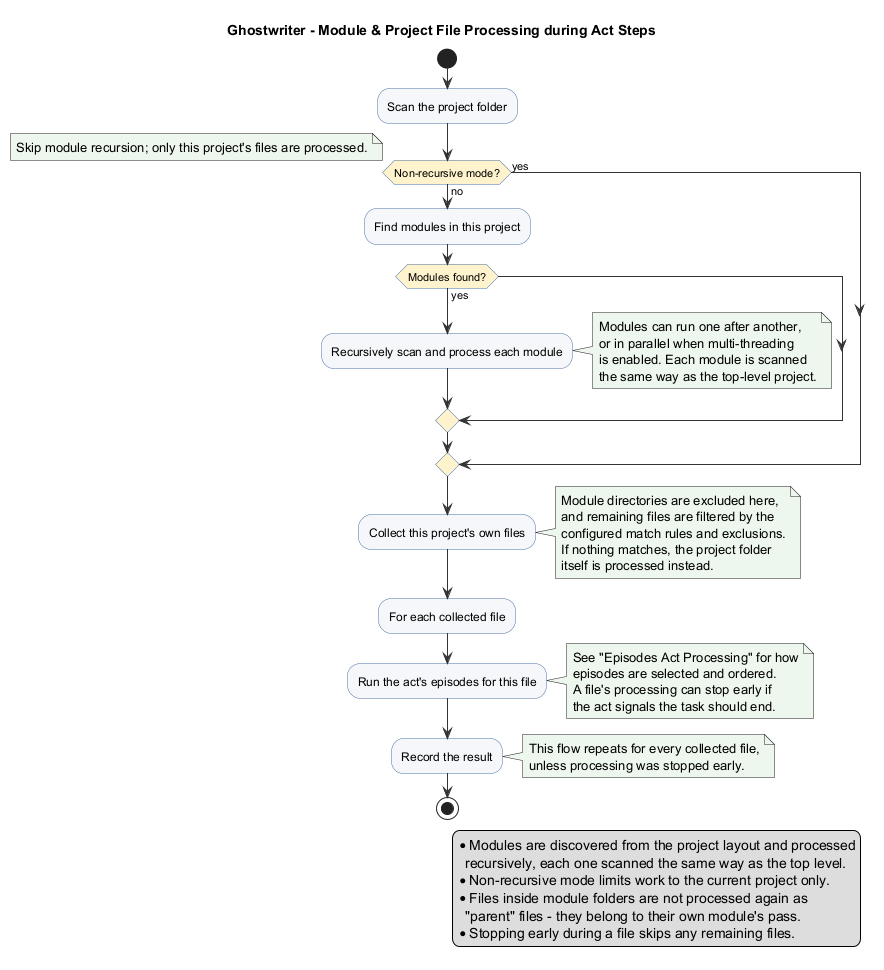
Processing begins in AbstractFileProcessor.scanFolder(File projectDir). It first
resolves the project structure by calling getProjectLayout(projectDir), which
returns a ProjectLayout describing the project's sources, tests, docs, and —
importantly — its modules.
The processor then decides whether to recurse into modules based on the non-recursive flag:
- If non-recursive mode is enabled, module recursion is skipped entirely, and only the current project's own files are processed.
- Otherwise, it proceeds to module discovery.
2. Module discovery and recursion
The processor reads the module list via projectLayout.getModules(). If one or
more modules exist, they are processed using one of two strategies, controlled by
the threads setting:
- Sequential (
threads <= 1): Each module is processed one at a time in a simple loop, callingprocessModule(projectDir, module). - Multi-threaded (
threads > 1):processModulesMultiThreaded()submits aprocessModuletask for every module to a fixed-size thread pool. It then waits for allFutureresults and safely shuts down the executor (bounded bymoduleThreadTimeoutMinutes). Interruptions and execution failures are surfaced asIllegalStateException.
Crucially, processModule recursively re-enters scanFolder for each
sub-module directory. This means the entire logic (module discovery + file
processing) repeats for every module, producing a full recursive traversal of a
multi-module project tree.
Why modules are the unit of parallelism. Modules in a well-structured project are largely independent (their own sources, tests, and build unit). Treating each module as an isolated work item means concurrency is safe by construction — two threads rarely touch the same file — without needing locks or a shared task queue. This is a much simpler concurrency model than the task-graph schedulers used by many autonomous multi-agent systems, and it maps cleanly onto real project topology.
3. Parent (non-module) file processing
After all modules are handled, scanFolder calls
processParentFiles(projectLayout). The base class provides an empty hook, but
ActProcessor overrides it to perform the actual Act work on files that
belong directly to the current project (not to its modules).
The steps are:
- List candidate files —
listFiles(projectDir)recursively collects files, excluding known build/tooling directories, and sorts them deepest-first (by path depth). - Filter the list — entries are removed if they are module directories
(
isModuleDir) or if they fail thematch()test. - Fallback — if no files match, the processor falls back to processing the project directory itself (so the act still runs once).
The match() method decides file inclusion using several rules:
- Rejects
nullfiles and any path under excluded directories (ProjectLayout.isExcludedPath). - If a
pathMatcheris configured, the file's project-relative path must match the glob/regex pattern; otherwise the file must equal the explicit scanpath. - Applies user-supplied
excludes[]patterns (glob, regex, or exact path).
Why deepest-first ordering matters. Sorting files by descending path depth means
leaf files are handled before their parent directories. For documentation and
aggregation acts this is useful: a parent (e.g. a package README or an aggregator
pom) can be generated after its children exist, letting a later step summarize
work that earlier steps produced. It is a lightweight, filesystem-level form of
dependency ordering, achieved without a planner.
4. Per-file Act (episode) execution
For each surviving file, if it matches and a default prompt is present, the Act's
episodes are executed via the Episodes component:
- Requested (selected) order — when a subset of episodes was selected (e.g.
act#1,3),requestedOrder()runs just those episodes in the requested sequence. If the!stop flag (disableNormalOrder) is set, processing of that file stops afterward; otherwise the normal order resumes from the next episode ID. - Regular order —
regularOrder(startId, callback)runs episodes sequentially. Each episode invokesActProcessor.process(), which prepends the act-execution metadata JSON, resolves the enabled tools (includingautotool selection), and sends the prompt to the GenAI provider viaAIFileProcessor.
Each episode's output is appended through addResults(perform).
Episodes as an explicit, inspectable plan. In most agent frameworks the plan is produced by the model at runtime and is therefore opaque and non-repeatable. In Ghostwriter the plan is the Act definition: an ordered list of episodes written in TOML, versioned in the repository, reviewable, and reusable. The model still reasons freely inside an episode, but the sequence of steps, their instructions, and their allowed tools are authored by a human. This makes Act execution closer to a declarative pipeline with LLM-powered stages than to an autonomous agent.
5. Control-flow and termination
During episode execution, several signals influence the flow:
RepeatEpisodeException— re-runs the current episode (iteration count increments).MoveToEpisodeException— jumps to another episode by numeric ID or by heading name.EndTaskException— records the message and stops parent-file processing for the current run.
When all modules and matching files have been processed, the collected outputs are
available through getResults().
Bounded, model-triggered control flow. These exceptions give the model some dynamic control — it can loop, jump, or stop — but only over a finite, named set of episodes that already exist. This is a deliberate middle ground: it keeps the adaptiveness that makes agents useful (retrying, branching on results) while removing the unbounded, potentially runaway behavior of fully autonomous loops. The set of reachable states is always known ahead of time.
Comparison with other AI agent strategies
Ghostwriter's model is best understood by contrasting it with the common patterns used to build AI agents and LLM applications.
ReAct / tool-calling agents (e.g. LangChain, AutoGPT-style loops)
A ReAct agent runs a single open-ended loop: think → call a tool → observe → think again, continuing until the model decides it is done. The plan emerges at runtime and is stored only in the conversation.
- Ghostwriter difference: the outer loop is a fixed project traversal, not a
model-driven loop. The model influences only the inner per-file episode order via a
small, bounded set of signals (
RepeatEpisodeException,MoveToEpisodeException,EndTaskException). - Trade-off: less spontaneous exploration, but far more predictability, cost control, and reproducibility. You always know which files will be touched and how many model calls (roughly) will occur.
Autonomous planner–executor agents (plan-and-execute, tree-of-thoughts)
These systems ask the model to first generate a plan, then execute (and often re-plan) it. The plan is dynamic and opaque.
- Ghostwriter difference: the plan is authored, not generated — it is the Act (an ordered list of episodes) checked into the repository as TOML.
- Trade-off: less autonomy in deciding what to do, but the plan is versioned, reviewable, reusable, and testable, which matters a great deal for engineering workflows and CI pipelines.
Multi-agent orchestration (crews, swarms, role-based agents)
Frameworks like multi-agent “crews” assign roles and let agents negotiate or delegate tasks to one another, often via a scheduler or shared blackboard.
- Ghostwriter difference: parallelism is structural — one work item per module, executed on a plain thread pool — rather than emergent from agent negotiation. There is no inter-agent messaging.
- Trade-off: no dynamic role assignment, but concurrency is safe by construction (independent modules) and trivial to reason about, with no coordination overhead or deadlock risk.
Retrieval-Augmented Generation (RAG) pipelines
RAG selects context by semantic similarity from a vector store and injects it into a prompt. Relevance drives what the model sees.
- Ghostwriter difference: context selection is structural and explicit — the
file being processed plus the episode's instructions and (optionally) referenced
includes — rather than similarity-ranked chunks. The
autotool-selection step is the one place where a model-driven narrowing happens, and even that is scoped to a single episode. - Trade-off: no fuzzy retrieval recall, but deterministic, auditable context: you can point to exactly which file and instructions produced an output.
Map-reduce / batch document processing
Classic batch pipelines apply the same operation to every document, then optionally aggregate. This is actually the closest analogue to Ghostwriter.
- Ghostwriter similarity: the traversal is essentially a map over files
(per-file episodes), and
getResults()/ later episodes can act as a reduce. - Ghostwriter addition: each “map” step is itself a multi-episode mini-workflow with bounded control flow, and the traversal is project-aware (modules, layout, exclusions) rather than a flat document list.
Summary of positioning
| Dimension | Autonomous agent (ReAct / planner) | RAG pipeline | Ghostwriter (Act + traversal) |
|---|---|---|---|
| What to work on | Model decides at runtime | Retrieval by similarity | Deterministic project traversal |
| Plan | Generated, opaque, ephemeral | Implicit (query → chunks) | Authored TOML Act, versioned & reusable |
| Context per step | Accumulated conversation | Similarity-ranked chunks | The current file + episode instructions |
| Parallelism | Rare / complex to coordinate | Query-level | Per-module thread pool, safe by construction |
| Model control flow | Unbounded loop | None | Bounded: repeat / move / end over named episodes |
| Reproducibility | Low | Medium | High |
| Best fit | Open-ended exploration | Q&A over large corpora | Structured, repeatable project-wide operations |
Bottom line. Ghostwriter deliberately trades away open-ended autonomy for structure, determinism, and reviewability. It is not trying to be a general agent that figures out a task from scratch; it is a project-aware execution engine that applies human-authored, LLM-powered workflows uniformly and predictably across every module and file of a codebase.
Summary of key rules
| Concern | Behavior |
|---|---|
| Modules | Discovered from ProjectLayout.getModules(), processed recursively (each re-enters scanFolder). |
| Concurrency | Sequential when threads <= 1; thread-pool based when threads > 1. |
| Non-recursive mode | Skips modules; processes only the current project's files. |
| Parent files | Exclude module directories and are filtered by match() (exclude dirs, pathMatcher, excludes[]). |
| Empty match | Falls back to processing the project directory itself. |
| Per file | Runs Act episodes (requested subset and/or regular order) against the GenAI provider. |
| Termination | EndTaskException halts parent-file processing. |