


The Bindex
Bindex means Brick Index. The name comes from the idea that software libraries can work like LEGO bricks: each library is a reusable component that can be selected, connected, and assembled into a larger application. A Bindex gives generative AI the precise API and integration metadata it needs to discover, select, and assemble those components into software solutions.
A bindex.json file is a structured metadata file that describes a software library in a standard way. It helps tools and AI assistants understand what a library is, where it can be found, and how it should be used. This makes libraries easier to discover, recommend, register, and integrate into applications.
What is a bindex.json file?
The bindex.json file is a machine-readable description of a library. It answers three important questions for developers and automated tools.
1. What is this library?
A Bindex file describes the identity and purpose of the library, including information such as:
- The library name, often in a format such as
groupId:artifactId. - The library version, usually following semantic versioning.
- A clear description of the project.
- The main features and capabilities, with code examples that show how they can be used.
- Classification details such as library type (for example library or plugin), application domain, and supported programming languages.
This information is especially useful for semantic search and library recommendation.
2. Where is the library located?
A Bindex file explains how the library can be retrieved, including:
- Repository type, such as Maven, npm, or PyPI.
- Repository URL.
- Coordinates such as group ID, artifact ID, and version.
- License information (for example MIT or Apache 2.0).
This helps users and tools locate the exact artifact that should be installed or referenced.
3. How can the library be used?
A Bindex file provides practical usage information, including:
- Constructors or setup information for creating and configuring objects and services, including package names, method signatures, and example code snippets.
- Customization points, such as configuration options, extension classes, or interfaces.
- Studs, which are gateway contracts (interfaces or abstract types) intended to be implemented or extended by consuming code, adapters, or integrations.
- Features and integration points that show how the library can be used in real scenarios.
Main Bindex schema properties
A valid bindex.json file follows the Bindex schema. Important properties include:
| Property | Type | Purpose |
|---|---|---|
id |
string | A unique identifier for the artifact, often including group ID, artifact ID, and version. |
name |
string | The canonical artifact name, typically formatted as groupId:artifactId for Maven artifacts. |
version |
string | The artifact version, preferably following semantic versioning. |
description |
string | A concise, human- and machine-readable summary of the project. |
authors |
array | Author or organization information, including name, email, and website. |
license |
string | The licensing model governing artifact usage. |
classification |
object | Type, domain, and supported languages used for semantic search and recommendations. |
location |
object | Repository type, URL, and artifact coordinates. |
features |
array | Core capabilities paired with illustrative examples. |
constructors |
array | Instructions for creating and configuring objects or services. |
customizations |
array | Extension points, configuration classes, and customizable options. |
studs |
array | Gateway interfaces or abstract classes used as integration boundary contracts. |
examples |
array | Practical installation, configuration, and usage scenarios. |
The full schema is available in the Bindex schema v2.
Creating a bindex.json file
A bindex.json file can be generated with the Bindex Act. The generation process uses GenAI to organize project documentation, public API information, and build metadata into a complete descriptor that follows the Bindex schema. This is faster than writing the descriptor by hand, but a developer should still review the result before it is registered.
For Java projects, the Bindex Act is designed to use generated Javadoc, the effective Maven build file, and the project's Markdown documentation. This helps ensure the file describes the public API and published-project metadata instead of relying on implementation details.
A typical creation process includes:
- Build the project Javadoc.
- Read the generated API documentation.
- Read the effective project build file.
- Create or update
bindex.json. - Validate that the JSON follows the Bindex schema.
- Review the generated file for correctness before registration.
Developers should always review the generated result. AI generation can save time, but the final metadata should be checked for accurate descriptions, correct versions, valid repository coordinates, useful examples, and complete classification details.
Registering a bindex.json file
After the bindex.json file is created and reviewed, the Maven Bindex sub-act registers it when the file exists. Registration stores the Bindex metadata so it can be used for discovery and semantic search; if the file is not found, registration is skipped.
During registration, the system typically:
- Opens the root
bindex.jsonfile and checks its schema. - Generates semantic embeddings from the description and features.
- Cleans and normalizes programming-language tags.
- Generates embeddings for the declared application domains.
- Stores the descriptor and its embeddings in a vector database.
- Returns a registration status and Bindex ID.
Once registered, the library becomes easier to find using natural-language requirements, because AI Assembly tools can match user intent with the metadata and semantic vectors stored from the Bindex file.
Bindex Act
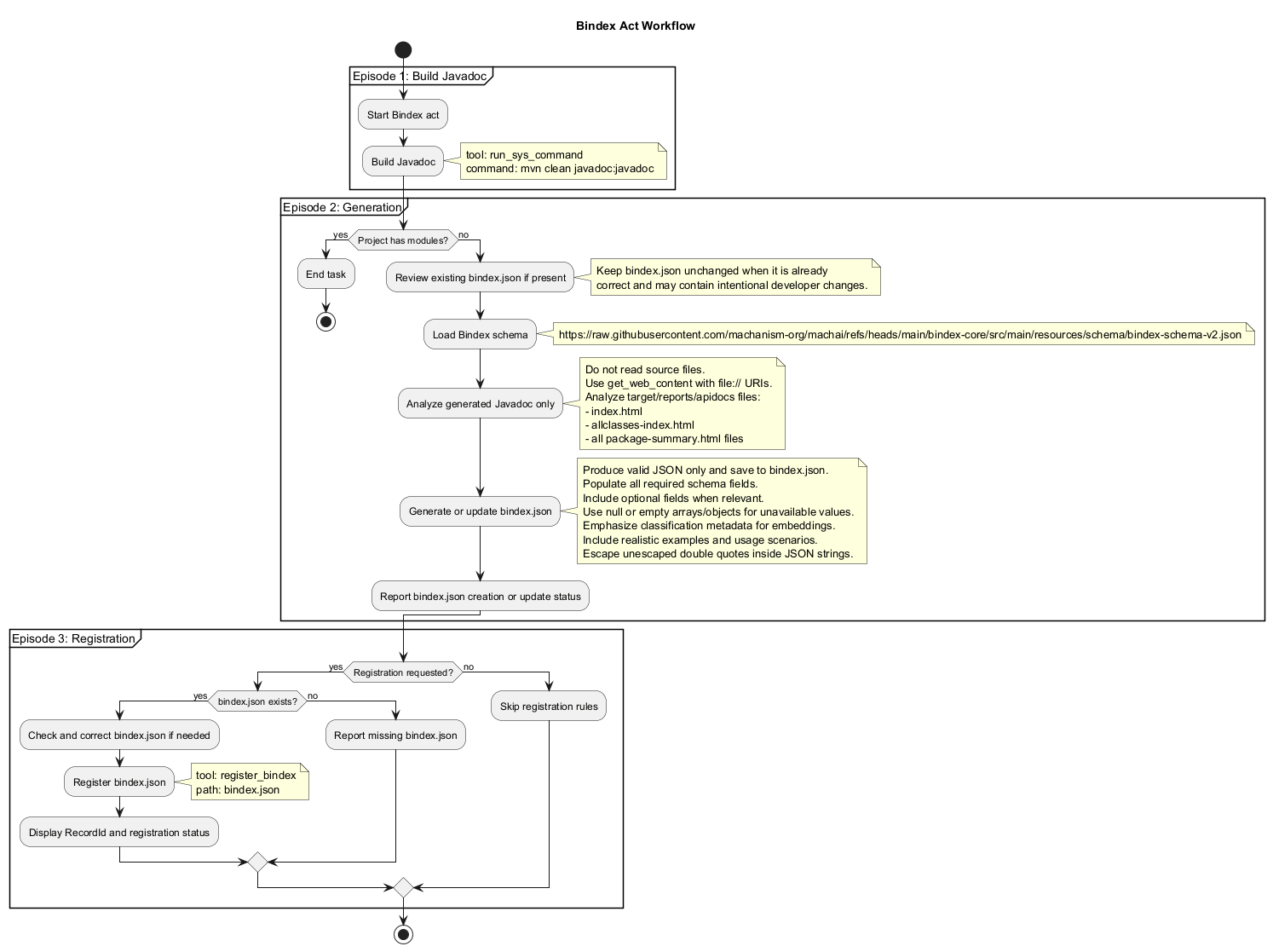
The Bindex Act is the top-level workflow for creating a Bindex descriptor. It first checks the MODULES project context value to determine whether the current project is a parent or aggregator project. If that value is empty and the project layout is Maven, it delegates to the bindex/java/mvn-project sub-act. That sub-act generates, validates, and registers bindex.json, helping turn a project into a Bindex-ready, discoverable library.
Purpose
Use the Bindex Act when you want to make a project easier for AI tools and developers to discover and use as a library. The Act generates a Bindex-compliant JSON file that describes the library, its features, installation details, configuration options, usage examples, and integration points.
When to use it
Use this Act when:
- A project should be published or consumed as a reusable library.
- You need a standard metadata file for library discovery.
- You want to improve semantic search and recommendation for the library.
- An existing
bindex.jsonfile may be outdated and needs to be refreshed. - You want to register the library metadata after reviewing the generated file.
Do not use the generation step for parent or aggregator projects that only organize modules and are not themselves usable libraries. The Bindex Act automatically detects this case: if the project contains modules (that is, when the MODULES project context value is not empty), the Act ends without generating a file. This protects aggregator projects from being described as standalone libraries.
Main functionality
The Act follows this simple decision flow:
- If the project has Maven modules, it stops without generating a descriptor for the parent or aggregator project.
- If the project uses Maven and is not an aggregator, it delegates to the
bindex/java/mvn-projectsub-act, which handles the full generation and registration workflow. - If the project layout is not supported, the Act ends with a clear message: “Project layout is not supported”.
Maven project sub-act: bindex/java/mvn-project
For supported Maven projects, this sub-act performs three main jobs: build the API documentation, generate and validate the descriptor, and register it when the file exists. It uses the project’s Markdown documentation, generated Javadoc, and effective Maven build metadata as the primary inputs, so the descriptor can describe both the public API and the published artifact accurately.
1. Build Javadoc
The Act builds the project Javadoc using a command similar to:
mvn clean install javadoc:javadoc -Dshow=protected -DreportOutputDirectory="target/reports" -DdestDir="apidocs" -DskipTests -q
This creates API documentation in target/reports/apidocs that can be analyzed to understand packages, classes, methods, and public usage patterns. This step is skipped when the project has no Java classes. If Javadoc generation reports errors or warnings, the Act attempts to fix them for no more than three iterations.
2. Generate or update bindex.json
The sub-act reads Markdown files under src/site/markdown, extracts information from the generated Javadoc HTML, and produces the effective Maven build file with a command similar to:
mvn help:effective-pom -Doutput=target/effective-pom.xml -q
The documentation, Javadoc extraction result, and effective build file are combined to generate or update a bindex.json file in the project root. The descriptor must follow the official schema; required fields must be present with the correct data types, and relevant optional fields should be included.
The generated file should include:
- Required schema fields.
- Realistic descriptions from package and class documentation.
- Library classification data for semantic search.
- Repository and coordinate information from the build file.
- Practical examples that explain how to install, configure, and use the library.
- Details about constructors, customizations, studs, and features when relevant.
For libraries that provide ready-to-use components (such as a CLI application or a Maven plugin), the generated examples include step-by-step instructions that show how to install the component, how to configure it, and how to run or invoke it in a real scenario.
The output must be valid, conveniently formatted JSON, must escape all inner double quotes, and must conform to the official Bindex schema. After generation, the sub-act validates the file with the Bindex validation tool (get_bindex using file://bindex.json) and fixes any issues before continuing.
3. Register bindex.json
If bindex.json exists after generation and validation, the sub-act registers it. After registration, it reports the returned Bindex ID and a status message. If the file is not found, registration is skipped.
Registration makes the library available for semantic search and future automated assembly workflows.
Best practices
To get the best results from Bindex:
- Keep project Javadoc clear and complete.
- Make sure the build file contains accurate metadata, including version, license, and repository information.
- Review generated examples to ensure they are practical and correct.
- Check that classification details describe the library domain and supported languages accurately.
- Validate the JSON before registration.
- Update and re-register the Bindex file when the public API or project metadata changes.
- Treat generated metadata as a reviewable release artifact: verify its identity, distribution details, examples, and integration contracts before publishing it.
Additional information
For more details, see the original Bindex documentation: https://machanism.org/bindex/index.html.