


Project Assembly
The Assembly act turns a plain-language application request into an initial, usable project. Describe what you want to build and any important preferences, such as the programming language, framework, database, platform, integrations, or deployment environment. The act uses generative AI, semantic library search, and structured Bindex metadata to find suitable components, create project files, and build the result. Rather than generating arbitrary code without context, it is designed to work with a curated library ecosystem, helping you start with practical, maintainable implementations while retaining control of the technical decisions.
In simple terms, Assembly helps you move from an idea to a buildable starting project. It looks for existing components that fit the idea, uses their documented integration information, and prepares the first version of the application for you to inspect.
Assembly is a starting point for development, not a substitute for review. Always check the generated code, dependencies, configuration, licenses, security, and behavior before using the project in production.
The process is intentionally supervised: Assembly can recommend components and prepare an initial implementation, but you decide whether the recommendations and generated files are appropriate. It can also produce a report of suggested libraries, integration details, and initial configuration for review before you continue developing the project.
What the Assembly Act Does
Assembly combines a Large Language Model (LLM) with a curated library ecosystem. As the workflow shows, it first discovers libraries, then implements and builds the project, and finally documents the result. The process is designed to reuse relevant libraries rather than recreate their functionality from scratch:
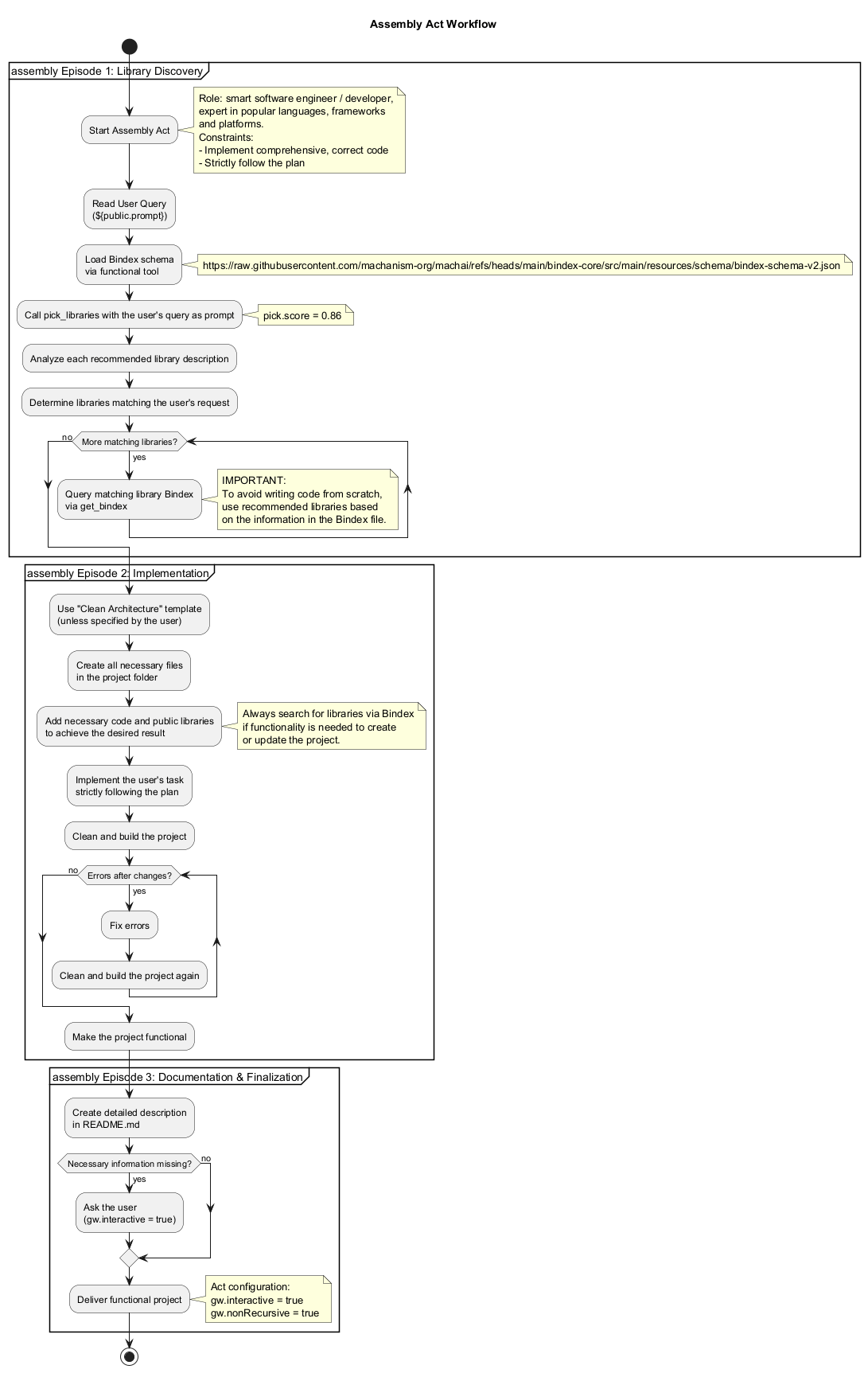
- Reads your request — You provide a natural-language description of the application, its purpose, and its main features. Include technical requirements when you know them. The act extracts important choices such as the programming language, framework, and database. For example: “Create a REST API application for managing a user login using Spring Boot and Commercetools.”
- Finds candidate libraries — The act sends your initial request to
pick_libraries, using its configured relevance threshold of0.86. Semantic search ranks libraries by their intended use, so results can match the meaning of your request rather than only its exact keywords. Review the recommended components to ensure they fit your needs. - Reviews library metadata — For every candidate that matches the request, the act
uses
get_bindexto retrieve its Bindex JSON description. It also retrieves the Bindex schema specified by the Assembly workflow and uses it to interpret that information consistently. The metadata can include features, integration points, usage examples, authorship, and licensing information that help the act use the library rather than recreate its functionality from scratch. - Plans and generates the project — The LLM uses function tools together with your
request and the selected Bindex information to create the files needed for the
application: a suitable directory
structure, build and dependency files (such as
pom.xml,build.gradle, orpackage.json), source-code templates, entry points, API endpoints, and integration examples. The generated structure follows best practices for the chosen language and framework; unless you request another structure, it uses the Clean Architecture template. Integration points and example usage for selected libraries are included where the request requires them. - Builds and corrects the project — The act cleans and builds the generated project and fixes errors it encounters, with the goal of leaving a functional implementation.
- Documents the result — The generated project includes a detailed
README.mdexplaining the project, its configuration, library integrations, and how to use it. The output includes the complete directory structure, build and configuration files, initial code templates, and integration guidance. You can then adapt the files to your own standards and requirements.
The library information used in this process comes from a bindex.json descriptor. For
each library, the descriptor can be produced by analyzing project artifacts such as build
files, source code, and other metadata. It records the library's capabilities, integration
points, examples, authorship, and license. These descriptors are indexed with semantic
embeddings so that a request can be matched by intent, not just by exact keywords. After
selection, Assembly can provide a report of suggested components, integration details, and
initial configuration for your review.
If the request does not contain information needed to continue, Assembly asks for the missing details. In an interactive session, you can clarify requirements before continuing.
When to Use This Act
Use Assembly when you want to:
- Create a new project quickly without manually preparing boilerplate, build files, dependencies, and an initial directory structure.
- Prototype an application and receive a buildable implementation to review and extend.
- Reuse existing libraries that match your requirements instead of writing common functionality from scratch.
- Explore integrations by having the assistant identify relevant components and generate initial configuration and example integration code.
Assembly is most effective when you provide a clear goal and enough detail for library selection. It is not the right choice when you need a fully production-ready system without engineering review, or when strict requirements must be decided before any generated code is considered. You remain responsible for reviewing the recommendations and verifying that the finished project meets your functional, security, quality, and licensing requirements.
How Library Selection Works
Each library in the ecosystem has a bindex.json descriptor. The descriptor is
generated from project artifacts such as build files, source code, and other metadata. It
records useful information about the library, including its capabilities, integration
points, examples, authorship, and license. Bindex files are indexed with semantic
embeddings in a vector database. This allows Assembly to find libraries by intent and
then use their documented integration information when generating the project.
The act also uses the Bindex schema to interpret this structured information consistently. The resulting project may include configuration files, initial implementation code, and customization guidance for the selected libraries. Developers remain responsible for verifying that the choices and generated implementation satisfy their functional, security, quality, and licensing requirements.
Tips for Better Results
- State the application's purpose and the most important features.
- Name the preferred language, framework, database, platform, or deployment environment when those choices matter.
- Describe required integrations and constraints, rather than requesting only a generic application.
- Review the generated source code, dependencies, configuration, build output, and
README.mdbefore continuing development or deploying the project.
Reference
For additional information about AI Assembly, including its library-selection and project- generation approach, see the AI Assembly documentation.