


Bindex MCP Server
The Bindex MCP server lets MCP-compatible AI tools access Bindex functionality through the Model Context Protocol (MCP). In practice, the Machai MCP Server hosts and publishes Bindex functional tools, while bindex-core provides the domain-specific capabilities exposed to clients.
This architecture is useful when you want a central, controlled runtime for AI tool integration. Instead of embedding Bindex behavior separately in each client, you can publish the same tool set from one MCP server and apply consistent configuration, governance, and observability across local development, shared environments, and automation pipelines.
What the MCP server does for Bindex
When Bindex is published through the Machai MCP server, MCP clients can discover and invoke Bindex-related tools for tasks such as:
- Retrieving metadata about libraries and other indexed assets.
- Picking relevant libraries for a task, dependency, or implementation context.
- Registering records so they can be searched, reused, and governed later.
- Improving governance and observability for AI-driven tool usage across teams and environments.
To review the public tools that can be exposed, see Functional Tools.
Prerequisites
Before starting the MCP server, make sure you have the following in place:
- Java 17 or a compatible newer Java runtime installed and available on your
PATH. - Access to the required JAR files.
- Model configuration values for the AI services you want the server to use.
- Network connectivity to any configured model providers.
- An available TCP port, such as
45000.
Required files
For command-line startup, you typically need these files in the same working directory:
machai-mcp-server.jarbindex-core.jar
Download them here:
Start the MCP server
Step 1: Download the required JAR files
Download machai-mcp-server.jar and bindex-core.jar into a working directory.
Step 2: Verify Java is installed
Check that Java is available:
java -version
If Java is not found, install a supported Java runtime and make sure java is available from your shell.
Step 3: Prepare configuration values
Gather the configuration values needed for your environment, for example:
GENAI_USERNAMEGENAI_PASSWORDembedding.modelgw.model- The server port
Step 4: Launch the server
Functional tools are published using the Machai MCP server by adding bindex-core.jar to the classpath.
java -DGENAI_PASSWORD=<password> -DGENAI_USERNAME=<user_name> \
     -cp machai-mcp-server.jar:bindex-core.jar \
     -Dembedding.model=CodeMie:text-embedding-005 \
     -Dgw.model=CodeMie:gpt-5.4-2026-03-05 \
     org.machanism.machai.mcp.server.McpServer \
     -p 45000
On Windows, use a semicolon (;) instead of a colon (:) in the classpath. For example, in PowerShell:
java "-DGENAI_PASSWORD=<password>" "-DGENAI_USERNAME=<user_name>" `
     -cp "machai-mcp-server.jar;bindex-core.jar" `
     "-Dembedding.model=CodeMie:text-embedding-005" `
     "-Dgw.model=CodeMie:gpt-5.4-2026-03-05" `
     org.machanism.machai.mcp.server.McpServer `
     -p 45000
Step 5: Connect an MCP-compatible client
After the server is running, configure your MCP-compatible client to connect to it. For setup patterns, transport details, and client configuration guidance, see the Machai MCP Server documentation.
Examples of tools that can be integrated include:
- Claude Desktop
- Cursor
- Windsurf
- VS Code with GitHub Copilot
- JetBrains IDEs
- Zed
- Warp
Example command-line usage
Minimal startup example
java -cp machai-mcp-server.jar:bindex-core.jar \
     org.machanism.machai.mcp.server.McpServer \
     -p 45000
Startup example with model configuration
java -DGENAI_PASSWORD=<password> \
     -DGENAI_USERNAME=<user_name> \
     -Dembedding.model=CodeMie:text-embedding-005 \
     -Dgw.model=CodeMie:gpt-5.4-2026-03-05 \
     -cp machai-mcp-server.jar:bindex-core.jar \
     org.machanism.machai.mcp.server.McpServer \
     -p 45000
Bindex functionality available through the MCP server
By publishing bindex-core.jar through the Machai MCP server, you make Bindex functional tools available to MCP clients. Depending on your configuration and exposed tool set, users can work with capabilities such as:
- Metadata retrieval for libraries and indexed records.
- Library picking to help select relevant libraries for a given problem or codebase.
- Record registration so useful assets and findings can be stored for later discovery.
- Shared, governed access to Bindex capabilities across multiple MCP-compatible clients.
This provides a central way to expose Bindex behavior while improving auditability, consistency, and operational visibility.
Integrating public Bindex tools with the MCP server
Public Bindex tools are published by the Machai MCP server when bindex-core.jar is included on the classpath. This allows MCP clients to discover and invoke Bindex tools from a shared runtime.
For client setup and configuration methods, refer to the Machai MCP Server documentation.
For a description of the available Bindex tools, see Functional Tools.
A typical command-line launch looks like this:
java -DGENAI_PASSWORD=<password> -DGENAI_USERNAME=<user_name> \
     -cp machai-mcp-server.jar:bindex-core.jar \
     -Dembedding.model=CodeMie:text-embedding-005 \
     -Dgw.model=CodeMie:gpt-5.4-2026-03-05 \
     org.machanism.machai.mcp.server.McpServer \
     -p 45000
This pattern is especially useful when you want one MCP server to publish a shared set of public Bindex tools for multiple users or client applications.
Maven project integration
If you want Maven-based automation, use the MCP Server Maven Plugin. It can start the MCP server as part of your build process and include Bindex tools through a plugin dependency.
Add the plugin to a Maven project
The following example shows how to add the plugin without execution configuration:
<plugin>
	<groupId>org.machanism.machai</groupId>
	<artifactId>mcp-server-maven-plugin</artifactId>
	<configuration>
		<port>45000</port>
		<params>
			<gw.model>CodeMie:gpt-5.4-2026-03-05</gw.model>
			<embedding.model>CodeMie:text-embedding-005</embedding.model>
			<GENAI_PASSWORD>[password]</GENAI_PASSWORD>
			<GENAI_USERNAME>[user_name]</GENAI_USERNAME>
		</params>
	</configuration>
	<dependencies>
		<dependency>
			<groupId>org.machanism.machai</groupId>
			<artifactId>bindex-core</artifactId>
			<version>[VERSION]</version>
		</dependency>
	</dependencies>
</plugin>
The same goal can be started without a lifecycle binding, which is useful for a short-lived local session or an integration-test setup:
mvn org.machanism.machai:mcp-server-maven-plugin:<version>:stateless \
    -Dmcp.port=45000 \
    -Dmcp.config=/path/to/mcp.properties
Use streamable instead of stateless when the MCP client requires streamable HTTP:
mvn org.machanism.machai:mcp-server-maven-plugin:<version>:streamable \
    -Dmcp.port=45000 \
    -Dmcp.config=/path/to/mcp.properties
Replace <version> with the plugin version used by the project. Keep credentials out of committed POM files where possible; pass them through secured Maven settings, environment-specific properties, or another secret-management mechanism. The plugin applies values from params as JVM system properties without overwriting properties that were already supplied.
Example plugin configuration with execution
The plugin provides the stateless and streamable aggregator goals. You can invoke either goal directly, or bind one to a Maven phase so the MCP server starts automatically during local builds or CI/CD runs. The server configuration file is supplied with mcp.config; the port is supplied with mcp.port.
<plugin>
    <groupId>org.machanism.machai</groupId>
    <artifactId>mcp-server-maven-plugin</artifactId>
    <executions>
        <execution>
            <id>start-mcp-server</id>
            <phase>pre-integration-test</phase>
            <goals>
                <goal>stateless</goal>
            </goals>
        </execution>
    </executions>
    <configuration>
        <port>45000</port>
        <configFile>${project.basedir}/mcp.properties</configFile>
        <params>
            <gw.model>CodeMie:gpt-5.4-2026-03-05</gw.model>
            <embedding.model>CodeMie:text-embedding-005</embedding.model>
            <GENAI_PASSWORD>[password]</GENAI_PASSWORD>
            <GENAI_USERNAME>[user_name]</GENAI_USERNAME>
        </params>
    </configuration>
    <dependencies>
        <dependency>
            <groupId>org.machanism.machai</groupId>
            <artifactId>bindex-core</artifactId>
            <version>[VERSION]</version>
        </dependency>
    </dependencies>
</plugin>
How the Maven plugin helps
The plugin can be used to automate MCP server startup and Bindex tool publication as part of the Maven build lifecycle. Once the server is running, an MCP client can invoke the registered Bindex tools; use the stop_mcp_server lifecycle tool to request an orderly shutdown. This is useful for:
- Repeatable local development workflows.
- CI/CD integration where the same MCP setup must be started consistently.
- Project-wide governance through standardized server configuration.
- Reduced manual setup when multiple developers or pipelines need the same Bindex-enabled MCP runtime.
Test with MCP Inspector
After the server starts, you can validate connectivity and inspect the published tools with MCP Inspector.
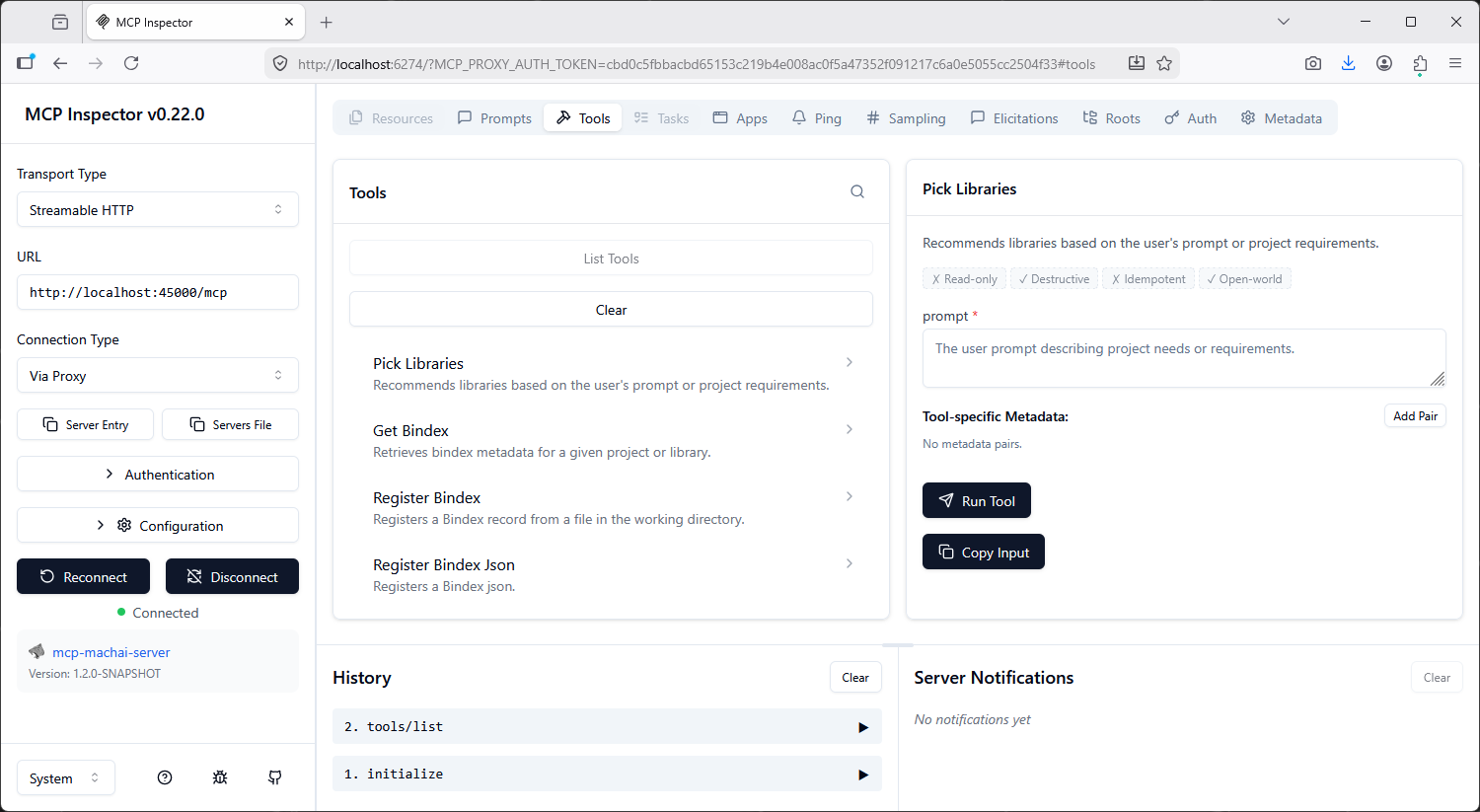
Use MCP Inspector to verify that:
- The MCP server is reachable on the expected port.
- Bindex tools are published and discoverable.
- Tool calls for metadata retrieval, library picking, and record registration respond as expected.
This is a practical way to confirm your server configuration before connecting full IDE or assistant integrations.
Troubleshooting tips
If something does not work as expected, check the following:
- Java not available: run
java -versionand verify your Java installation andPATH. - Port conflicts: change the configured port or stop the process already using it.
- Authentication errors: confirm that
GENAI_USERNAMEandGENAI_PASSWORDare set correctly. - Classpath problems: verify that both
machai-mcp-server.jarandbindex-core.jarexist and are referenced correctly. - Wrong classpath separator: use
;on Windows and:on Unix-like systems. - Client connection issues: ensure the MCP client is configured to connect to the running server using the correct transport and endpoint settings.
- Missing Bindex tools: confirm that
bindex-core.jaris included so the server can publish the Bindex functional tools.
Documentation, downloads, and support resources
Quick start summary
- Download
machai-mcp-server.jarandbindex-core.jar. - Verify Java is installed.
- Start the Machai MCP server with
bindex-core.jaron the classpath. - Configure your MCP-compatible client.
- Test Bindex features such as metadata retrieval, library picking, and record registration.
- Add the Maven plugin if you want repeatable project-level automation and governance.